Paper commentary
LiveSVG: Zero-Shot SVG Animation via Video Generation
LiveSVG fits vector shapes to a generated video to animate them
- Problem Existing SVG animation methods struggle with complex motion. LLM-written code cannot express fine curve deformations, and SDS gives noisy gradients that users cannot preview or edit.
- Method LiveSVG generates a target video from a frozen image-to-video model, then fits the original SVG to it with differentiable rendering. It uses per-group homographies and per-path Bézier control-point offsets, and needs no skeleton.
- Results LiveSVG significantly outperforms existing methods on AniClipart and ChallengeSVG. The Veo 3.1 variant won against every baseline in the human study.
Where SVG animation gets stuck
Animating an SVG means moving many interconnected Bézier paths so the shapes deform coherently, which is harder than drawing static vector art. Training data is the first obstacle, because existing animated-SVG collections mostly hold simple UI elements or procedural motion. Those collections miss the non-rigid deformations that articulated subjects need, so large supervised training stays impractical.
Lacking such data, recent work borrows motion priors from large foundation models instead of training on animated examples.
The first route has an LLM or VLM write the animation code directly, as Vector Prism does. Vector Prism produces coherent motion programs, but it struggles with fine-grained geometric deformations. Describing smooth curve motion coordinate by coordinate uses up the LLM context as the SVG grows more complex. The output ends up as coarse, rigid transformations rather than the curve-level motion that organic animation needs.
CSS and SMIL formats restrict the model to affine motion, and attempts at free-form paths often produce coordinate hallucinations.
The second route places a video diffusion model inside the optimization loop through Score Distillation Sampling. SDS renders the current candidate video, adds diffusion noise at a random timestep, and follows the frozen model's denoising prediction. That gradient keeps the target motion implicit and noisy during optimization, so users can't preview or edit it before fitting ends.
Many SDS pipelines also rely on skeletons or pose estimators, which limit them to humans or animals and add runtime. Khandelwal's method, for example, still depends on a skeleton-like motion scaffold.
Fitting the SVG to a generated target video
LiveSVG generates the motion first as a concrete video, then fits the original SVG to that video as a fixed target. The video model runs once to produce the target, rather than acting as a stochastic prior inside the optimization loop. This decoupling is the central design choice, because animation generation and vector optimization become separate stages.
The separation keeps the motion specification apart from the vector fitting, so either part can change without touching the other.
A fixed target turns fitting into a reconstruction problem with a well-defined objective, instead of chasing a noisy gradient signal. Users can inspect, reject, or edit the target video before any optimization begins. Closed generators such as Veo can be plugged in, because the fitting stage only sees the finished target frames. Table 1 places this against prior methods on unconstrained motion, skeleton-free operation, open domain and complex scenes.
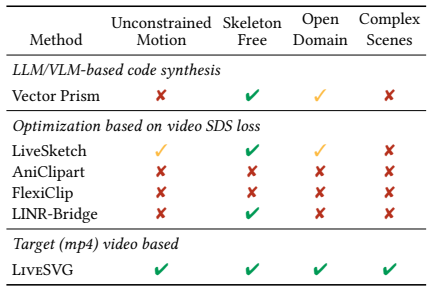
Table 1 . Comparison of prior SVG animation approaches and LiveSVG. We compare key practical capabilities for open-domain SVG animation: unconstrained motion, skeleton-free operation, and complex-scene handling. A half checkmark denotes partial support.
Original paper · CC BY 4.0The pipeline takes a static SVG and a motion prompt, and it uses an LLM to group elements before any fitting starts. The fitting stage optimizes the SVG with a differentiable renderer, using per-group homographies and per-path Bézier control-point offsets. For example, a character's arm and leg with similar colors make their crossings hard to resolve under a direct MSE objective.
The fix is a temporary recoloring of each path with maximally separated RGB values, chosen as sphere centers from a best-known packing in the unit cube. The exported animation returns to the original colors, so the editable SVG content stays unchanged.
Preparing the SVG and the target video
Before any video is generated, LiveSVG asks an LLM, in a zero-shot manner, to group the SVG parts that should move together. The LLM inserts flat, non-nested <g> tags, so a nod can move the eyes, nose, mouth and hair as one unit. The authors treat this grouping as a motion prior rather than a hard limit, because each path can still deviate through its learned control-point offsets.
Grouping mistakes are tolerated in practice, since the group transform only supplies coarse motion.
Layer order matters when elements occlude each other, because SVG rendering follows a painter's algorithm where later elements sit on top. The authors optionally estimate a better order from the target video, using SAM2 to measure how much exclusive area each group keeps where two groups compete.
Pixel-space MSE fitting has an ambiguity when two distinct paths share similar colors, because the gradients see only local color differences. To avoid this, LiveSVG recolors each recolorable path with its own color, taken as a sphere center from a best-known sphere-packing solution in the unit cube [0, 1]3. The authors use this palette only during target generation and optimization, and write the final animation back in the original colors.
The recolorized SVG is rendered to an image and passed, with a motion prompt, to a frozen image-to-video model. The prompt requests flat 2D vector-style animation, solid block colors, and no new details, because fixed-color fitting assumes fixed colors and a fixed set of primitives. Color drift can produce false MSE gradients, and 3D out-of-plane motion can reveal geometry that the SVG cannot represent.
The same LLM reranks the top candidates in a second stage, and the highest-ranked video becomes the target. Gemini 3.1 Pro handles grouping and filtering, while LTX 2.3, WAN 2.2 and Veo 3.1 were examined as video generators.
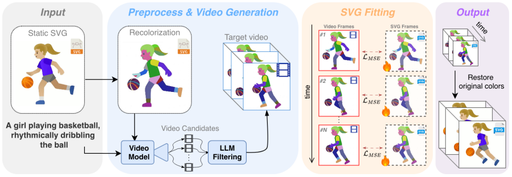
Fig. 3 . Overview ofLiveSVG. We first preprocess the input SVG with semantic grouping and sphere-packing recolorization, then generate candidate videos from the recolorized SVG and filter them to select the best target video. Finally, we fit each target frame back to the SVG by optimizing per-group homographies and per-path Bézier control-point deformations.
Original paper · CC BY 4.0 · Matan Levy, Ran Margolin, Bar Cavia, Dvir Samuel, Yael Pritch, Shmuel Peleg, Alex Rav Acha, Ariel Shamir, Dani Lischinski · LiveSVG: Zero-Shot SVG Animation via Video Generation · Original paper figure · Extracted the figure area from page 5 of the original PDF.How the fitting optimization runs
Each path also gets learned offsets, so at keyframe \(k\) a canonical control point \(p_i\) becomes \(\tilde{p}_{i,k} = p_i + \Delta_{i,k}\). Homographies carry the coherent part motion, and offsets carry bending and squash-and-stretch within each part.
The main data term is a pixel-space mean squared error computed after a Gaussian blur of both target and rendered frames. The loss is \[L_{MSE} = \frac{1}{K}\sum_{k=0}^{K-1}\lVert G(R_k)-G(I_k)\rVert_2^2\], with \(R_k\) the k-th target frame, \(I_k\) the k-th rendered frame and \(G\) the blur. The differentiable renderer passes gradients from this loss back to the homographies and path offsets.
Exponential spatial regularization penalizes differences between offsets of neighboring control points, with weights that shrink as their distance grows. A G1 term, with a ±10° angle tolerance at shared anchors, discourages sharp kinks at joints that were originally smooth. The foreground SDF penalty is \[L_{SDF}=\frac{1}{K}\sum_k\frac{1}{|P|}\sum_i \max(0, D_k(q_{i,k})-\tau)^2\], and it only charges control points that drift beyond the margin \(\tau\) outside the foreground.
The total objective is a weighted sum of these four terms, with weights \(\lambda_{mse}\), \(\lambda_{spatial}\), \(\lambda_{g1}\) and \(\lambda_{sdf}\).
Fitting all frames from the static pose at once is fragile, since the MSE gives little signal when a rendered element doesn't overlap its target. The authors instead activate keyframes one at a time, copying the homographies and offsets from the previous keyframe into the new one. The authors argue this turns a hard long-range alignment into a sequence of local updates.
Copying can still be too weak under large motion or partial occlusion, such as in low-FPS video. Anchor points from earlier frames are tracked into the incoming frame with TAPNext, and high-confidence points predict new offsets. A masked reconstruction check picks between the tracked version and the previously learned path, so one tracking failure doesn't spread.
The default run uses 15 keyframes and 2000 optimization iterations at 256× 256 resolution.
Human preference results
Workers on Amazon Mechanical Turk compared unlabeled animations made from the same SVG and prompt, judging overall visual preference. The authors tested three LiveSVG variants, each built on a different video model: Veo 3.1, LTX 2.3, and WAN 2.2. Each variant keeps the same SVG fitting stage and changes only the generator that produces the target video.
A filtering oracle picks the best of the three target videos for each example, mirroring a user who previews targets before fitting.
The Veo 3.1 variant beats every baseline, while the WAN 2.2 variant stays competitive with AniClipart and FlexiClip. Figure 4 shows per-baseline preference rates for the filtering oracle, ranging from 76.2% to 100.0%.
The authors read this sensitivity to the reference generator as expected, because better image-to-video models can pass better motion to the same fitting stage. Against Vector Prism, the human win rate was 67.6%, the lowest of the five baselines in Figure 5. LiveSketch received the highest loss rate for LiveSVG at 98.6%, so the win rate there was 98.6% for LiveSVG.
The Figure 5 win rates come from ChallengeSVG, so they form a separate test from the AniClipart study.
The second check uses an automated judge, not human raters.
Automatic metrics and cost
X-CLIP measures prompt alignment, and LiveSVG (Veo 3.1) prints 0.216 on it. The no-animation row prints 0.211 on the same metric, so the static input sets the baseline. LINR-Bridge prints 0.215 among the optimization-based rows, the same value as LiveSVG (LTX 2.3). LiveSketch sits lower at 0.206, and the X-CLIP margins across the rows are small.
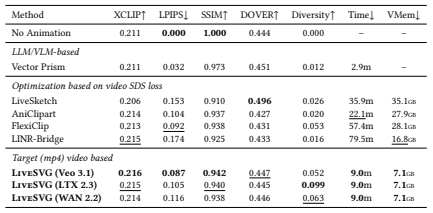
Table 2 . Quantitative comparison on the AniClipart benchmark. For optimization-based methods,boldmarks the best value and underlining marks the second best.
Original paper · CC BY 4.0LPIPS is lower-is-better, and LiveSVG (Veo 3.1) prints 0.087 there. That value sits below AniClipart at 0.104 and LiveSketch at 0.153. LINR-Bridge prints 0.174, the highest LPIPS among the optimization-based rows. Vector Prism prints 0.032, but it's an LLM/VLM code-synthesis method outside the optimization group.
The time column reports mean wall-clock time per SVG, and LiveSVG (Veo 3.1) prints 9.0m. LiveSketch prints 35.9m and 35.1GB, while LINR-Bridge prints 79.5m and 16.8 GB. LiveSVG (Veo 3.1) prints 7.1GB of GPU memory, the lowest VMem among the optimization-based rows.
The text notes that the LTX and WAN variants give the strongest cross-seed diversity. The authors tie that diversity to decoupling motion generation from SVG fitting.
Limitations and what the evidence leaves open
LiveSVG depends on the quality and SVG compatibility of the generated target video, so the fitting stage can only be as good as its input. The authors list color drift, invented parts and large occlusions as failure sources that can harm the optimized SVG and introduce artifacts. The prompt asks for flat 2D motion with solid block colors and no new details, because fixed-color MSE tracking breaks when colors drift or 3D rotation appears.
Tracking-based initialization and the layer-order estimate both rely on the target video, so errors there can carry into the fit. The evaluation uses 43 AniClipart examples and a new 35-example ChallengeSVG benchmark, with pairwise human studies and automatic metrics on AniClipart. The excerpt reports no ablation that switches off recoloring, semantic grouping or tracking, so their individual contributions aren't isolated here.
Only three video generators were examined: LTX 2.3, WAN 2.2 and Veo 3.1, so behavior with other generators isn't tested here.
The authors read the reliance on the reference generator as expected, since better image-to-video models should improve the target motion. They didn't report how the target video quality was measured beyond the LLM scoring and reranking, which the supplementary material covers. The authors conclude that LiveSVG achieves state-of-the-art results on both benchmarks, with stronger prompt alignment and appearance preservation.
Because the target video is previewable, a user can inspect or regenerate it before committing to SVG optimization.
Paper info
- Authors
- Matan Levy, Ran Margolin, Bar Cavia, Dvir Samuel, Yael Pritch, Shmuel Peleg, Alex Rav Acha, Ariel Shamir, Dani Lischinski
- Venue
- arXiv · Preprint
- First published
- 2026-5-28
- Added
- 2026-11-4
- Updated
- 2026-5-28
- Version
- v1
- arXiv
- 2605.30174
- Category
- cs.CV
- Original paper terms
- CC BY 4.0
- What we show
- Paper info, commentary and permitted figures from the original paper
AI commentary is a separate explanation from the original paper and may contain errors. The original paper and figures follow each source's terms of use and any rights noted separately.
Abstract
We introduce LiveSVG, a zero-shot approach for generating Scalable Vector Graphics (SVG) animations using video diffusion models. Current SVG animation methods struggle with complex motions: LLM-based code synthesis fails to express fine, non-rigid Bézier deformations, while Score Distillation Sampling (SDS) provides noisy gradients and often requires category-specific priors like skeletons. In contrast, LiveSVG fits vector geometry directly to an explicitly generated target video. Given an input SVG image and a motion prompt, we generate a previewable target video using a frozen image-to-video model, then fit the original SVG to this video via differentiable rendering. Our fitting stage is skeleton-free, utilizing a dual-level motion representation that combines per-group homographies for coarse articulation with per-path Bézier control-point offsets for local deformations. To resolve color-induced correspondence ambiguities during pixel-wise fitting, we introduce a novel sphere-packing recolorization strategy. We also present ChallengeSVG, a benchmark of complex, multi-object scenes that exposes the limitations of prior work. Evaluations demonstrate that LiveSVG significantly outperforms existing methods on both AniClipart and ChallengeSVG, establishing direct reference-video fitting as a practical, robust route to prompt-aligned and fully editable vector animation.
Quote from the paper
Matan Levy, Ran Margolin, Bar Cavia, Dvir Samuel, Yael Pritch, Shmuel Peleg, Alex Rav Acha, Ariel Shamir, Dani Lischinski (2026). LiveSVG: Zero-Shot SVG Animation via Video Generation. arXiv:2605.30174v1. https://arxiv.org/abs/2605.30174v1
BibTeX
@misc{levy2026livesvg,
  title = {{LiveSVG: Zero-Shot SVG Animation via Video Generation}},
  author = {Matan Levy and Ran Margolin and Bar Cavia and Dvir Samuel and Yael Pritch and Shmuel Peleg and Alex Rav Acha and Ariel Shamir and Dani Lischinski},
  year = {2026},
  eprint = {2605.30174},
  archivePrefix = {arXiv},
  url = {https://arxiv.org/abs/2605.30174v1}
}