Paper commentary
ScreenProof: Where Is This Screen Wrong? Finding UI Faults Without a Reference
ScreenProof finds UI faults on phone screens without any reference design
- Problem Frontier judges flag too many clean pages to serve as a first pass before designer review. They flag 18 to 62% of clean real screenshots, so a reviewer gets every page sent back.
- Method ProofJudge is a small critic, Qwen3.5-9B with a LoRA of rank 128, trained on code-made pages with one to four faults. It keeps a finding only when it is confident.
- Results ProofJudge reaches F1 0.48 on the consistency test, above Gemini 4 Argon at 0.37. It is the only fault-finding judge within 15% false alarms on clean pages.
Why frontier judges can't serve as a first pass
Current judges fail as a first pass because they flag too many clean pages. A generated page usually reaches a reviewer with no reference design and no specification, so the screenshot is all a critic sees. A critic could screen such pages before a designer looks, passing the clean ones and returning only the flagged ones with an element and a reason.
That only works if the critic stays quiet on clean pages, since a critic that flags most of them sends every page back to a person.
No frontier judge keeps both rates within the 15% gate. Gemini 4 Argon comes closest, flagging 18% of real screenshots and 18% of generated pages. Claude Opus 5.5 flags 62% of real and 82% of generated clean pages, while gpt-6.1-sol flags 38% and 36%.
They find 47–72% of text layout faults, with Gemini 4 Argon at 47% and gpt-6.1-sol at 54%. Claude Opus 5.5 boxes 80% of clean pages and 96% of hard negatives in the text layout test. Knowing a defect differs from finding it: frontier models answer 28–31 of 31 brand-free design questions in words. Yet they name the defect in a red box only 41–59 of 70 times, which points to a gap in finding faults on unmarked pages.
Judging each element against its own page
The consistency test holds 576 such faults, split into icon 188, accent 179, material 123 and radius 86. General faults, such as a label running off the screen, don't need this comparison because they are wrong in any design. ProofJudge asks only which elements are wrong on the page itself, since a 9B model can't learn eight design languages from public pages.
Training that comparison needs exact labels, so the data engine injects each fault into HTML code instead of pasting it onto pixels. Copies whose change isn't visible on the first screen are discarded.
Hard negatives cover the opposite case, where every sibling changes alike and the page stays internally consistent. A judge that flags such a page is making a false alarm, which is why hard negatives test the gate. The text layout test holds 71 hard negatives alongside 75 clean pages, and every sibling changes alike in them. Text layout faults follow the same pattern, with one text element changed in its spacing, line height or line breaks.
Two of the rules are wrong only against siblings, so a hard negative is the only way to separate them from a consistent page.
The payoff of this design shows in the results: ProofJudge reaches an F1 of 0.48, above Gemini 4 Argon at 0.37. Its recall on local style faults is lower than Argon's, at 25% against 41%. Without the confidence cut, the same model still reaches 0.46, so the lead doesn't come from the cut alone.
How ProofJudge is built and trained
ProofJudge starts from Qwen3.5-9B with thinking disabled, and its vision encoder stays frozen. The base model is not changed in its weights; instead, a LoRA of rank 128 sits on all linear language-model layers. Training is supervised fine-tuning on the label JSON, so the model learns to output the exact engine label for each page.
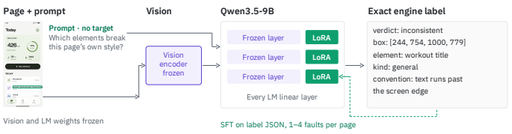
Figure 3 . Overview of ProofJudge. A data-engine page and prompt pass through Qwen3.5-9B with its vision encoder and weights frozen; one LoRA on every linear layer of the language model is trained by SFT on the label JSON across pages with one to four faults each. The prompt gives no target and asks which elements break the page’s own style. The label is exact: the engine made the title overflow, a general fault under any design.
Original paper · CC BY 4.0 · Huiming Sun, Yue Li, Kangning Yang, Ruineng Li, Jie Cai, Lan Fu, Yunwan Fu, Jinlong Li, Jinglin Shen · ScreenProof: Where Is This Screen Wrong? Finding UI Faults Without a Reference · Original paper figure · Extracted the figure area from page 5 of the original PDF.The training data is ScreenProof-Train, with 17,285 rows on 11,424 images from 990 pages. Each training page carries one to four independent faults of general, display, local style or text layout kinds. Of the rows, 42% are clean pages, which teaches the model that many pages need no finding. No test or validation page requirement appears in the training data, so the test pages stay unseen.
The data engine makes the faults in page code, so each training label is exact.
Two runs that differ only in seed can land up to 0.04 F1 apart on validation. The authors therefore trained twice and averaged the two adapters' updates, each taken at its final step. The confidence cut matters, yet without it the model still reaches F1 0.46.
Capacity is the main lever: a rank-16 adapter reaches F1 0.40 on the consistency test. F1 rises from rank 16 to rank 128 and then stops there. The rank-64 adapter reaches a pair F1 of 0.445, and rank 128 reaches 0.481. The authors validated rank 256 once but did not test it, so its F1 is not reported. A 9B model can't learn eight design languages from public pages, so ProofJudge asks only which elements are wrong on the page itself.
Consistency test results: ProofJudge versus the frontier judges
On the consistency test, ProofJudge reaches F1 0.48, against 0.37 for Gemini 4 Argon, the best API judge on that score. The lead doesn't come from the confidence cut alone, because the same model without the cut still scores 0.46. The model is Qwen3.5-9B with a LoRA of rank 128, and its vision encoder stays frozen. Two seeds are trained and their adapters averaged, because two runs can land up to 0.04 F1 apart on validation.
The trade-off shows up in recall on local style faults. ProofJudge finds 59% of general faults, more than any other judge, while API judges find 31 to 49%. On local style faults it reaches 25%, below Gemini 4 Argon at 41%. Its weakest local results are on foreign icons, at 5%, and on local faults that look normal on their page. The paper suggests that staying quiet costs subtle local faults, and the repair test later returns to this.
On the text layout test, ProofJudge finds 43% of faults, against 47% for Gemini 4 Argon. It does well on needless ellipses at 96% and on broken words at 94%. It finds only 5% of labels whose characters touch, so its text layout recall is uneven.
Whether findings help a fixer
The fix test asks whether a critic's findings let a generator repair a page better than no hint at all. They add 40 clean generated pages, where a false finding should change nothing. The fixer is gpt-6.1-sol, and it receives the page's HTML, its screenshot and one hint. The hint is either none, the true finding, or a judge's findings with the instruction to fix only the real problems.
It also changes 12% of the clean pages, so silence is the missing piece.
So Gemini 4 Argon's findings lower the fix rate to 55%. Argon's findings harm 15% of clean pages, per the paper.
Neither judge combines silence on clean pages with finding the small faults. The cost of the gates is $49 for the Argon gate and $17 for the ProofJudge gate per 1,000 pages. Those costs assume a fixer call of about $0.080, and the paper leaves screenshot-only repair untested.
Real screens, cost and a cheap first check
OwlEye's real Android screenshots test whether ProofJudge's skill carries beyond ScreenProof's own pages. Flagging every screen scores F1 0.67 on these 600 screenshots, half of which show display issues. ProofJudge reaches F1 0.72 and flags 25% of normal screenshots, with accuracy 73%. Gemini 4 Argon leads this set with F1 0.86, so ProofJudge's lead on ScreenProof doesn't carry over.
Across 21 judges and variants, the consistency-test F1 correlates with the OwlEye F1 at ρ = 0.58.
On one A100-80GB, ProofJudge takes 1.0 s per page, and at 16 concurrent requests it costs about $0.04 per 1,000 pages. That cost assumes $2 per GPU-hour. Gemini 4 Argon takes 6.1 s per page and costs $4.42 per 1,000 pages. That timing used an earlier rank-16 adapter, not the rank-128 model in the consistency results.
Next, gpt-6.1-sol looked only at the 42% of pages that ProofJudge flags. Its box F1 rose from 0.30 to 0.32, and its precision rose from 25% to 36%. Its recall fell from 37% to 28%, while clean real screenshots flagged dropped from 38% to 1%. Generated pages flagged fell from 36% to 4%, with 416 API calls per 1,000 pages instead of 1,000. Its F1 fell from 0.37 to 0.33, below ProofJudge alone.
Together they reach recall 55% against Argon's 40% and F1 0.44, still below ProofJudge alone.
What the tests don't cover
The tests cover single phone screens, without interaction or motion. Most false alarms stay with the judges, but some label noise remains.
Scores come from model judges, and the paper's model uses two seeds while most earlier ProofJudge variants were trained once. Without code, the judge's location matters more, and the authors didn't test this.
The authors didn't test whether this saves designers time, so a study with designers is future work.
Paper info
- Authors
- Huiming Sun, Yue Li, Kangning Yang, Ruineng Li, Jie Cai, Lan Fu, Yunwan Fu, Jinlong Li, Jinglin Shen
- Venue
- arXiv · Preprint
- First published
- 2026-11-6
- Added
- 2026-11-10
- Updated
- 2026-11-6
- Version
- v1
- arXiv
- 2611.10234
- Category
- cs.AI · cs.SE
- Original paper terms
- CC BY 4.0
- What we show
- Paper info, commentary and permitted figures from the original paper
AI commentary is a separate explanation from the original paper and may contain errors. The original paper and figures follow each source's terms of use and any rights noted separately.
Abstract
A phone screen can be wrong in ways that need no reference: a label that runs off the screen, letters that touch, a line that breaks one character before its end, one button with sharp corners among round ones. We ask whether a model can box every such fault on a screenshot, given no target design and no reference image. Such a critic could serve as a cheap first pass over generated pages before a designer reviews them, but only if it stays silent on clean pages. ScreenProof poses this target-free critique over three families of faults: general faults, local style faults (one element breaks the style its page sets) and text layout faults (letter spacing, line height, line breaks). A data engine makes each fault in page code and records the changed element's box, and hard negatives change every sibling alike. No frontier judge is reliable: frontier models flag 18-62% of clean real screenshots and 18-82% of clean generated pages, find 47-72% of text layout faults, and rarely find a foreign icon (5-19%). Our small critic ProofJudge (Qwen3.5-9B with LoRA), trained on code-made pages with one to four faults each and keeping a finding only when it is confident, reaches F1 0.48, the highest of all judges (Gemini 4 Argon 0.37; open models at most 0.15; 0.46 even without the confidence cut), and is the only fault-finding judge within 15% false alarms on clean pages (2% real, 9% generated), the property such a first pass needs, at about a hundredth of Argon's cost. It finds the most general faults (59%) but fewer local style faults than Argon (25% against 41%) and fewer text layout faults than the API judges (43%; Gemini 4 Argon 47%). Against a named brand the task is harder still: models know a design language about as well as its public documentation states it.
Quote from the paper
Huiming Sun, Yue Li, Kangning Yang, Ruineng Li, Jie Cai, Lan Fu, Yunwan Fu, Jinlong Li, Jinglin Shen (2026). ScreenProof: Where Is This Screen Wrong? Finding UI Faults Without a Reference. arXiv:2611.10234v1. https://arxiv.org/abs/2611.10234v1
BibTeX
@misc{sun2026screenproof,
  title = {{ScreenProof: Where Is This Screen Wrong? Finding UI Faults Without a Reference}},
  author = {Huiming Sun and Yue Li and Kangning Yang and Ruineng Li and Jie Cai and Lan Fu and Yunwan Fu and Jinlong Li and Jinglin Shen},
  year = {2026},
  eprint = {2611.10234},
  archivePrefix = {arXiv},
  url = {https://arxiv.org/abs/2611.10234v1}
}