Paper commentary
Sprint3D: Accelerating End-to-End 3D Asset Generation through Pipeline Optimization
Sprint3D cuts image-to-3D asset generation time by moving mesh work to GPU
- Problem Released image-to-3D pipelines spend most of their time after the networks, not in sampling. Prior work mostly sped up the networks, so the CPU mesh post-processing stayed slow.
- Method Sprint3D keeps the released Pixal3D networks and weights fixed. It rebuilds UV unwrapping on the GPU, then distills the four rectified flows from 76 to 8 network evaluations.
- Results Sprint3D's median time per asset fell from 133 s to 4.05 s on one H200 GPU. On held-out Toys4K objects, it improves every input-view normal metric but has slightly lower silhouette IoU.
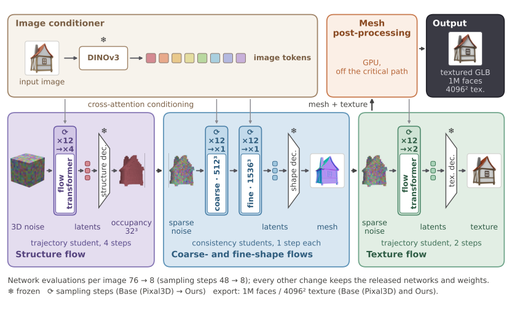
Figure 2 Our pipeline.The four flows of Pixal3D in three panels, with their sampling steps (Base (Pixal3D) → Ours) and the changes we apply.
Original paper · CC BY 4.0 · Sho Kuno, Ruihan Yu, Yonghao Yu, Guixu Lin, Lian Fu, Muyao Niu, Yu-Ju Tsai, Zheng-Hui Huang, Yi-Chuan Huang, Siqi Yang, Fengbo Lan, Erwin Wu, Kaipeng Zhang, Zhixiang Wang · Sprint3D: Accelerating End-to-End 3D Asset Generation through Pipeline Optimization · Original paper figure · Extracted the figure area from page 5 of the original PDF.Where the time goes in a released image-to-3D pipeline
Creators rarely run an image-to-3D generator only once, so the wall-clock time per asset sets how fast they can iterate and what each asset costs to serve. Most acceleration work targets the generative networks through few-step distillation, caching and compression, and it reports only the latency of the accelerated network. The three released pipelines the authors ran that write a textured asset all unwrap UVs with xatlas on the CPU.
The authors study Pixal3D because its public code and weights let them measure and change its end-to-end time. Its released implementation runs four rectified flows on TRELLIS.2 structured latents, conditioned on the input pixels. Stage by stage, mesh post-processing takes 85% of the mean end-to-end time in the dedicated timing run. The four flows with their conditioning take 14% of that time, and most of the post-processing is one step, UV unwrapping.
That unwrap combines a GPU chart clustering with the CPU unwrapper xatlas and takes 94 s on average. The four flows together take less time than this single unwrap step.
The first is the mesh post-processing, which runs on the CPU and on the critical path. The authors measure the effect of each change on end-to-end time, so the ordering follows the order in which these limits appear.
Keeping the networks and changing what runs around them
Sprint3D keeps every released network and weight fixed and removes latency around them, one bottleneck at a time. The profile shows three bottlenecks, and each one limits latency once the previous one is removed. The first bottleneck is the mesh post-processing, which runs on the CPU and sits on the critical path. The rebuilt path replaces the CPU unwrap with a single-pass GPU chart segmentation and takes the work off the critical path.
The segmentation finds charts without iterative clustering, parameterizes each chart by a per-chart projection, and packs the charts into one atlas. Each chart's projection direction is picked from a fixed set, with each face taking the nearest direction. This single change removes 30.5 s, the largest saving after the tiled mesh path itself.
Once the post-processing is off the critical path, each network evaluation still carries avoidable cost. Sprint3D computes the conditioning once, sharing the DINOv3 features and the upsampling encoder across the four flows. Sprint3D runs FlashAttention-3 in bf16 for the texture and fine-shape flows, where results differ only by floating-point rounding.
The structure and coarse-shape flows keep their attention kernels, because the structure stage thresholds its active voxels, so bf16 perturbations would flip voxels.
What remains is the number of network evaluations, and Sprint3D distills each flow separately. The coarse- and fine-shape flows become consistency-distilled students with one step each. The structure and texture flows become trajectory students that reproduce the 12-step teacher trajectory in fewer steps. Each student is a rank-256 LoRA adapter on the frozen network of its teacher, so the released weights stay untouched.
Because the students run without guidance, they take 4+1+1+2 = 8 network evaluations per image. Reducing steps without training failed, since the discretization error grows as the steps drop.
The chart segmentation is output-changing, while the attention kernel changes are near-identical. The students are output-changing, so these changes have to be checked against the finished asset.
Did the speed-up hold up in measurement
The headline speed-up comes from the dedicated timing run, where each method had its own machine and requests ran one at a time. Sprint3D's median end-to-end time was 4.05 s, against 133.0 s for Base (Pixal3D), a ratio of 33×. The cumulative measurement then splits this gain across the three groups of changes, in the order they were applied.
Those factors are 7.3× for the rebuilt post-processing, 1.2× for flow engineering and 3.8× for distillation.
Applied in reverse order, the students and flow optimizations alone give only 1.15× on the serial post-processing. With the post-processing rebuilt last, the same reverse order gives 30.1×, so most of the factor comes from the mesh post-processing. The re-run of Base (Pixal3D) reaches a median of 138.4 s, close to the 133.0 s of the dedicated run.
Adding the tiled mesh path alone cuts that re-run from 138.4 s to 55.3 s while the 12-step flows stay in place.
The quality check uses the Pixal3D protocol on 2,653 held-out Toys4K test objects, each evaluated once with one fixed view. Sprint3D is significantly better than Base (Pixal3D) on all ten input-view normal columns, using a Holm-adjusted sign test. Its mean silhouette IoU is slightly lower, because a tail of 21 objects sits at least 10 pt below Base (Pixal3D).
Sprint3D's advantage is spread across objects, and the overlap-region normal PSNR rises by 0.70 dB on average.
TRELLIS.2 calls the same GLB export code, so the rebuilt mesh path was applied to TRELLIS.2-4B. Median E2E time fell from 112.7 s to 16.9 s, a 6.7× speed-up. The normal-map metrics didn't change, and the variant with the adaptive half-resolution remesh reached 6.8×. A conservative estimate that gives the authors none of the slower generation on some inputs yields 5.7×.
What the speed-up costs in alignment and texture
Sprint3D gives up some ground on point-cloud alignment, even though it wins on the input-view normal metrics. Its ULIP-2 and Uni3D scores are slightly and significantly lower than those of Base (Pixal3D) on the test part. On the same test part, Sprint3D is slightly higher than Base (Pixal3D) in CLIP. The authors attribute these lower scores to the shape rather than the texture, as shown by their validation-set analysis.
Remeshing with a half-resolution grid doubles the thickness of the inner wall, which is never rendered, so the rendered metrics stay the same while the alignment scores drop.
The texture stage shows the second cost, because the 2-step texture student keeps less fine detail than its 12-step teacher. Sprint3D is significantly better than Base (Pixal3D) in SSIM and LPIPS on the base color, yet its renders sit at a significantly larger Fréchet distance from the ground truth. Exchanging the texture flow alone shows that this shift comes from the 2-step texture student.
The step count matters most on the normal metrics, and sampling the released flows with fewer steps shows the limit. The one-step shape students score higher on the normal metrics than the 12-step flows, and the authors attribute this to averaging.
Limitations of the speed-up
The structure stage's predicted support is the main limitation, since it causes most of the error against the ground truth. The authors point to Appendix D.2 for the numbers behind this comparison.
The second limitation is point-cloud alignment, where Sprint3D scores lower than the released pipeline under ULIP-2 and Uni3D. The cause is the remeshed shell, whose inner wall is thicker because the halved grid doubles its thickness. That inner wall is never rendered, so the rendered metrics don't change. The analysis behind this explanation sits in Appendix D.3.
The renders of this student carry 11% less gradient energy than those of the teacher. Distribution-matching objectives could recover this detail for the texture stage, as the authors note. The authors tried a texture student trained by mean-flow distillation, but it overshot the fine detail. They leave this direction open.
Every other measurement runs on the validation set, which also served for model selection. Because Sprint3D was selected on that validation set, its numbers there may carry selection bias. The held-out test part is therefore the basis for the main quality claims.
Paper info
- Authors
- Sho Kuno, Ruihan Yu, Yonghao Yu, Guixu Lin, Lian Fu, Muyao Niu, Yu-Ju Tsai, Zheng-Hui Huang, Yi-Chuan Huang, Siqi Yang, Fengbo Lan, Erwin Wu, Kaipeng Zhang, Zhixiang Wang
- Venue
- arXiv · Preprint
- First published
- 2026-11-12
- Added
- 2026-11-13
- Updated
- 2026-11-12
- Version
- v1
- arXiv
- 2611.16701
- Category
- cs.CV · cs.GR
- Original paper terms
- CC BY 4.0
- What we show
- Paper info, commentary and permitted figures from the original paper
AI commentary is a separate explanation from the original paper and may contain errors. The original paper and figures follow each source's terms of use and any rights noted separately.
Abstract
Image-to-3D generative models now produce asset-quality textured meshes, but at minutes per asset they remain slow to iterate with and costly to deploy. Prior work has mostly accelerated the sampling of the networks, and where it also optimizes the mesh processing, it trains its own generators. We instead start from a publicly released pipeline and ask how much of its end-to-end time can be saved. Profiling the public Pixal3D pipeline shows that its latency is dominated by what happens after the networks: the four rectified flows take 14% of the wall-clock time and mesh post-processing takes 85%, most of it in CPU-based UV unwrapping. We therefore first rebuild the mesh post-processing on the GPU and take it off the critical path, then cut the per-evaluation overhead of the flows and distill them from 76 to 8 network evaluations. The resulting pipeline, Sprint3D, reduces the median time per asset from 133 s to 4.05 s on one H200 GPU at the same export settings (33$\times$). At the same time, on 2,653 held-out Toys4K objects it improves every input-view normal metric of the Pixal3D protocol, with a slightly lower mean silhouette IoU, lower point-cloud alignment scores and less fine texture detail. The rebuilt post-processing alone also speeds up TRELLIS.2, which uses the same export code, by 6.7$\times$ without a detectable change in the evaluated metrics.
Figures from the paper
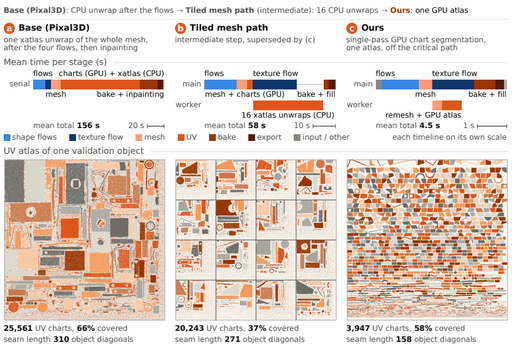
Figure 3 Three ways to build the UV atlas.(a) Base (Pixal3D); (b) the tiled mesh path, an intermediate step; (c) Sprint3D, with the GPU chart segmentation. Top: mean time per stage, two lanes for concurrent work (Appendix Table 7). Bottom: the atlas of one validation object, charts in random tones, with chart count, texel coverage and seam length (object diagonals).
Original paper · CC BY 4.0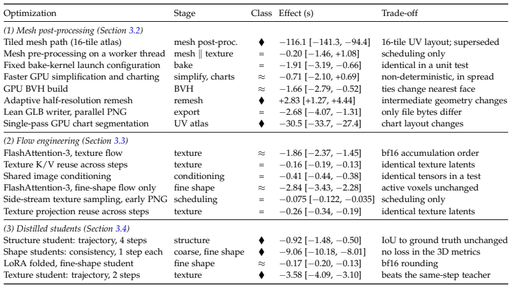
Table 1 The adopted optimizations, in the order of the cumulative measurement; a later row can replace an earlier one. Class: = output-identical, ≈ near-identical, ♦ output-changing. Effect: paired mean change of the E2E time when the row is added [95% CI over the inputs]. Verification of the = and≈rows: Appendix A.
Original paper · CC BY 4.0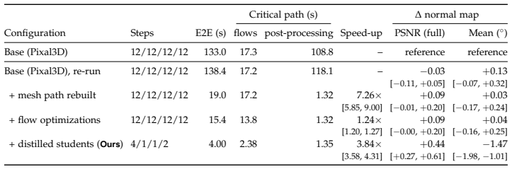
Table 2 Progressive design analysis.Base (Pixal3D): dedicated timing run; other rows: the first row and the ends of the three groups of the cumulative measurement. Steps: structure / coarse-shape / fine-shape / texture; critical path: medians of the per-input sums; speed-up: ratio of medians to the row above;∆: paired difference to Base (Pixal3D).
Original paper · CC BY 4.0
Table 3 The rebuilt mesh path in TRELLIS.2.TRELLIS.2-4B at its released settings on the 40-object subset; only the mesh post-processing is carried over, not the flow engineering (Section 3.3) or the distilled students (Section 3.4). Speed-up and∆: against TRELLIS.2 (official);∆color: input-view base-color PSNR against the input image.
Original paper · CC BY 4.0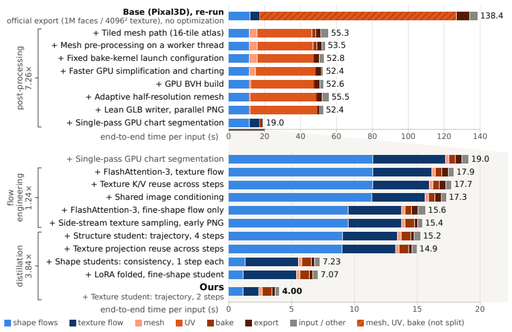
Figure 4 Cumulative measurement.Each row adds one change to the row above, grouped as in Section 3 (left: group factors). Bars: median critical-path time per stage (shape flows: structure, coarse- and fine-shape flows); gray: remainder to the median E2E time; hatched: the released export, timed as one call. Lower panel: row 9 on a 0–20 s axis.
Original paper · CC BY 4.0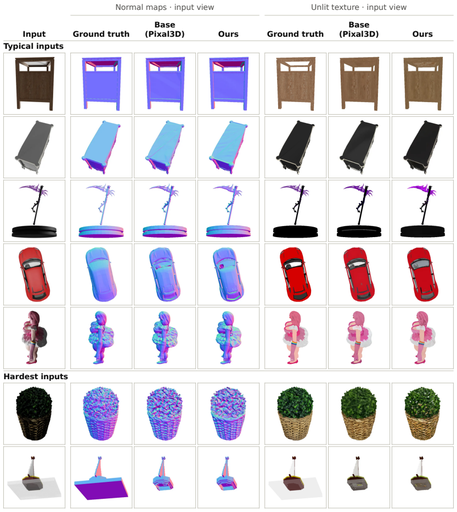
Figure 5 Qualitative comparison.Seven inputs of the 40-object subset, rendered from the input camera: the input image, then the normal maps and the unlit base color of the ground truth, Base (Pixal3D) andOurs. Rows 1–5: typical inputs, in order of increasing angular error of Base (Pixal3D); rows 6–7: the two inputs with the largest error forOurs(selection: Section 4.4).
Original paper · CC BY 4.0
Table 5 One part of Sprint3D changed at a time.First block: students replaced by alternatives; second block: each student replaced by its same-step teacher (Section 3.4). Each block is one run, and E2E compares only within a block (Ours: first / second run). Second block: ∗ / † against theOursrow; CD and F@0.01: Appendix C.
Original paper · CC BY 4.0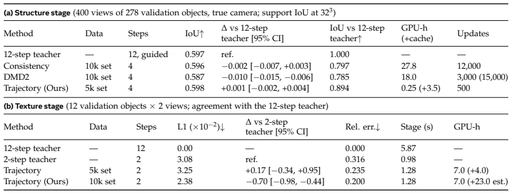
Table 6 Distillation methods per stage.(a) Support IoU against the ground truth and against the 12-step teacher’s support. (b) Agreement with the 12-step teacher (decoded-color L1, relative latent error). Updates: of the student (whole run in parentheses); Stage: texture-stage time; GPU-h: training time×GPUs (+ teacher-trajectory cache; est.: estimated).
Original paper · CC BY 4.0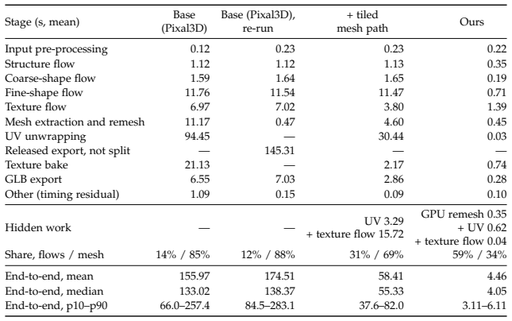
Table 7 Per-stage profile.Mean time per input on the critical path; concurrent work listed as hidden work; shares: mean stage time over mean E2E time. Base (Pixal3D),Ours: dedicated timing run; re-run, + tiled mesh path: cumulative measurement. UV unwrapping: GPU chart clustering, then CPU xatlas (Ours: GPU chart segmentation).
Original paper · CC BY 4.0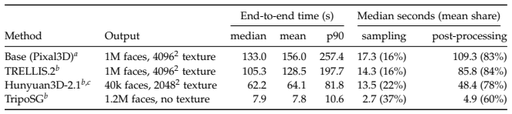
Table 9 End-to-end time of the released pipelines.The 77 inputs of the dedicated timing run; shares: means of per-input shares. Sampling: conditioning and flow or diffusion sampling; post-processing: the rest, including latent decoding. a Dedicated timing run. b Timed while generating the baseline outputs. c Sampling includes multi-view diffusion and super-resolution.
Original paper · CC BY 4.0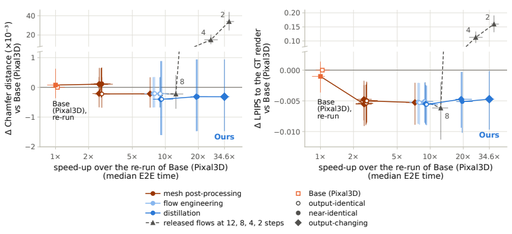
Figure 6 Quality against speed-up, paired to Base (Pixal3D).The rows of Figure 4: mean paired difference to Base (Pixal3D) in Chamfer distance and base-color LPIPS against the speed-up over the re-run, each with its 95% CI. Circles: output-identical (open), near-identical (filled); diamonds: output-changing; squares: Base (Pixal3D) (open), its re-run (filled); triangles: the released flows at 12, 8, 4 and 2 steps.
Original paper · CC BY 4.0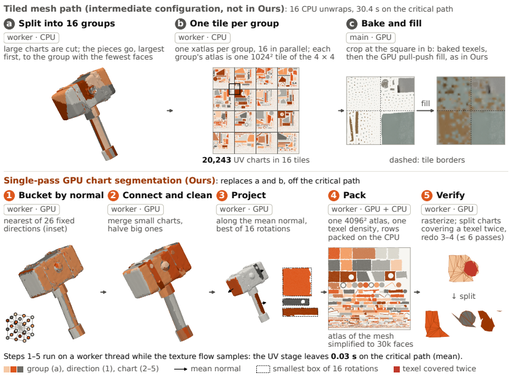
Figure 7 Two ways to build the UV atlas, step by step.One validation object, shown simplified to 30k faces. Top: the tiled mesh path (not in Sprint3D): charts assigned to 16 groups (a), each unwrapped by xatlas into one tile of a 4 × 4 atlas (b); GPU pull-push fill (c). Bottom: the single-pass GPU chart segmentation (1–5), replacing (a) and (b).
Original paper · CC BY 4.0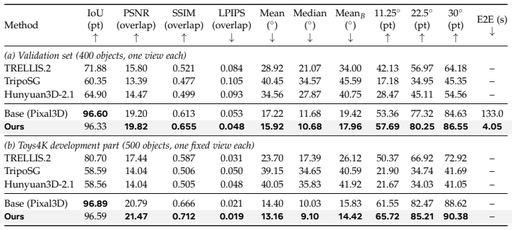
Table 10 Table 4 on the validation set and on the Toys4K development part.(a) The 400 validation objects, which also served model selection, one view each; E2E as in Table 4. (b) The 500 development objects, one fixed view each (Appendix B); E2E not measured on this set.
Original paper · CC BY 4.0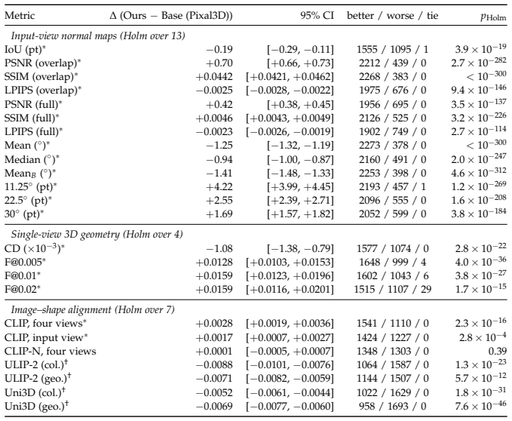
Table 12 Paired statistics of Table 4.The 2,651 Toys4K test objects with an output of both pipelines.Ours − Base (Pixal3D): mean difference with 95% CI, objects better / worse / tied, sign-test p Holm-adjusted within each block; ∗ / †: significantly better / worse.
Original paper · CC BY 4.0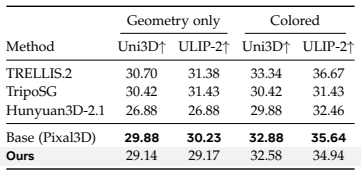
Table 13 In-the-wild images, protocol of the Pixal3D paper’s Table 2.Image–shape alignment ( ×100) with ULIP-2 and Uni3D, geometry only and colored, on 150 images we collected (100 Internet photographs, 50 generated), scored on the 149 with an output from every method. No ground truth; descriptive. TripoSG has no texture.
Original paper · CC BY 4.0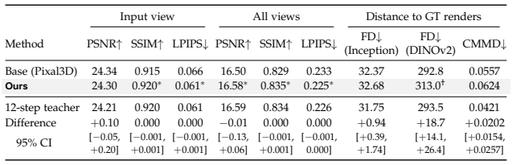
Table 15 Appearance against the ground-truth base color.Unlit base color of the 339 validation objects with exportable materials; metrics: paragraph “Appearance against the ground truth”. ∗ / †: Holm-adjusted over a family of 18 tests fixed in advance (Appendix B). Last rows: the texture flow exchanged alone, in one separate run.
Original paper · CC BY 4.0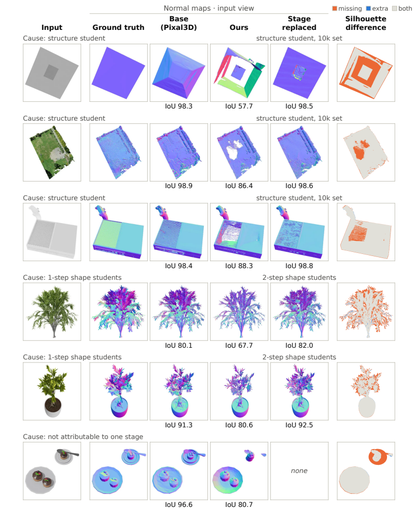
Figure 8 The six failure objects of Section 4.4.Per row: the input; normal maps of the ground truth, Base (Pixal3D),Ours andOurswith one stage replaced (rows 1–3: structure student trained on the 10k set; rows 4–5: 2-step shape students; row 6: none recovers it), each with its silhouette IoU; silhouette difference to the ground truth (orange: missing; blue: extra).
Original paper · CC BY 4.0Quote from the paper
Sho Kuno, Ruihan Yu, Yonghao Yu, Guixu Lin, Lian Fu, Muyao Niu, Yu-Ju Tsai, Zheng-Hui Huang, Yi-Chuan Huang, Siqi Yang, Fengbo Lan, Erwin Wu, Kaipeng Zhang, Zhixiang Wang (2026). Sprint3D: Accelerating End-to-End 3D Asset Generation through Pipeline Optimization. arXiv:2611.16701v1. https://arxiv.org/abs/2611.16701v1
BibTeX
@misc{kuno2026sprint3d,
  title = {{Sprint3D: Accelerating End-to-End 3D Asset Generation through Pipeline Optimization}},
  author = {Sho Kuno and Ruihan Yu and Yonghao Yu and Guixu Lin and Lian Fu and Muyao Niu and Yu-Ju Tsai and Zheng-Hui Huang and Yi-Chuan Huang and Siqi Yang and Fengbo Lan and Erwin Wu and Kaipeng Zhang and Zhixiang Wang},
  year = {2026},
  eprint = {2611.16701},
  archivePrefix = {arXiv},
  url = {https://arxiv.org/abs/2611.16701v1}
}