Paper commentary
Sonar-MoE: In-Backward Expert Updates for Memory-Efficient Mixture-of-Experts Training
Sonar-MoE frees expert gradients during backward to cut MoE training memory
- Problem Standard MoE training keeps every expert gradient in GPU memory until the optimizer step. Experts hold most parameters, so these gradients grow with model size and can decide whether fine-tuning fits on one GPU.
- Method Sonar-MoE applies AdamW to each batched expert tensor during the backward pass and frees its gradient right away. Non-expert parameters keep the standard path with global-norm clipping.
- Results On OLMoE-1B-7B, peak memory falls from 55.55 GB to 43.57 GB with ScatterMoE-style kernels, with held-out loss within 0.003 of all baselines.
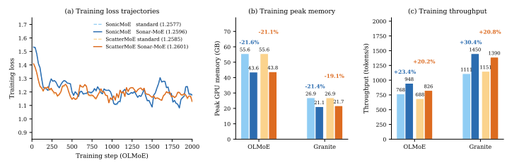
Figure 1 . Alpaca fine-tuning of OLMoE-1B-7B and Granite-3.1-3B-A800M for 2,000 steps with the SonicMoE and ScatterMoE back- ends, standard training with global-norm clipping (baseline) vs. SONAR-MOE. (a) Training loss on OLMoE; (b) peak GPU memory; (c) throughput averaged over steps 201–2,000.
Original paper · CC BY 4.0 · Avni Mittal, Avinash Anand, Ashutosh Kumar, Dikshant Kukreja, Kritarth Prasad, Chaitanya Lakhchaura, Rishitej Reddy Vyalla, Erik Cambria, Zhengkui Wang, Rajiv Ratn Shah · Sonar-MoE: In-Backward Expert Updates for Memory-Efficient Mixture-of-Experts Training · Original paper figure · Extracted the figure area from page 2 of the original PDF.Why expert gradients pile up
Standard MoE training keeps gradients alive because the optimizer runs only after the whole backward pass finishes. The last MoE layer's gradient waits in memory until backward reaches the first layer. An element-wise optimizer such as AdamW doesn't need that wait, because each tensor's update depends only on its own gradient and optimizer state.
The cost is large in MoE models, because the experts hold most of the parameters. In OLMoE-1B-7B the experts hold 6.44B of 6.92B parameters, and their bf16 gradients alone take 12.9 GB. On a single GPU, that gradient memory can decide whether fine-tuning fits at all.
Dense-model methods avoid the wait by running the update inside backward, using a PyTorch hook that fires when a gradient is ready. That approach rules out global-norm clipping, since no gradient survives to the end of the step. The authors observe that experts hold almost all of the gradient memory, so they update only the experts early.
Updating expert tensors inside the backward pass
SONAR-MoE releases expert gradients by applying each update as soon as that gradient is complete, and it does this only for the expert tensors. PyTorch's post-accumulate hook makes this possible, because it calls a function once a parameter's gradient has been fully accumulated. Every other parameter keeps the standard path with global-norm clipping, so the clipping constraint survives for attention, embeddings and routers.
Each MoE layer stores its experts as two batched tensors, the up projection and the down projection, with shapes set by E, n and d. One grouped GEMM computes the weight gradient of all experts in one of these tensors at a time, so SONAR-MoE attaches one hook to each tensor. Across L layers this gives 2L hooks in total, and the hooks skip the per-expert slices that a list of modules would create.
Backward visits the MoE layers from L down to 1, and each layer's down tensor is updated and freed before its up tensor. The hook applies a fused AdamW update using the tensor's gradient and optimizer state, then sets the gradient to None so the memory can be reused. The retained expert-gradient memory is therefore bounded by one layer, which is 0.8 GB for OLMoE rather than 12.9 GB.
The bound is written as the maximum over layers of the expert weight counts, and the authors state it is roughly the full floor divided by L. The hooks read the learning rate during backward, so the learning rate for step t must be set before backward rather than after it. The update is the same one standard training applies when its clipping excludes the expert tensors, and the authors verify that the two are bitwise identical.
Why hooks sit on batched tensors
Hook placement changes the number of hook calls per step, and the paper ties that count to the expert layout. On OLMoE with E=64 and L=16, that is 2,048 calls instead of 32.
On OLMoE, per-expert hooks add 23.6 ms per step, which is 20%, or about 12 µs per extra optimizer call. On Granite, with E=40 and 32 layers, the same change adds 61.1 ms, which is 72%, or about 24 µs per extra call. The gap grows with E, because modern MoE designs favour many small experts.
Table 3 shows that both layouts hold the same peak memory on OLMoE, 43.57 GB for batched hooks and 43.58 GB for per-expert hooks. On OLMoE, step time was 116.1 ms with batched hooks and 139.7 ms with per-expert hooks. On Granite, batched hooks took 84.4 ms per step while per-expert hooks took 145.5 ms. Per-expert hooks keep the memory saving and lose time, so the answer to the section question is that placement changes speed, not memory.
Held-out loss barely moves with the layout, at 1.2596 for batched hooks and 1.2600 for per-expert hooks on OLMoE. Per-expert hooks give the same expert weights as batched hooks, so the update itself doesn't change. The authors therefore attach SONAR-MOE hooks to the batched tensors, which keeps the same update at a lower call count.
What global-norm clipping forces
Global-norm clipping needs every gradient before any update can start, and the expert gradients are gone by then. SONAR-MOE has already applied its update to the expert tensors and freed their gradients before the global norm is known. So the method keeps global-norm clipping only for the non-expert parameters, which stay on the standard path.
The authors compare against two baselines, because the clipping choice changes what a timing comparison means. Standard training with global clipping clips the norm of all parameters to 1.0 before one fused AdamW step. Standard training without expert-gradient clipping clips only the non-expert parameters and performs exactly the SONAR-MOE update.
Any speed difference between these two arms therefore comes from when the update happens, not from the update itself. The clipping cost is concrete: on OLMoE, clipping the expert gradients takes 26.9 ms of kernel time per step against 1.8 ms without it. The norm reads the 12.9 GB of gradients, then reads and writes them again to rescale them.
All-parameter optimizer-in-backward is a third arm that updates every parameter in its own hook, so it can't clip at all.
Gradient accumulation adds a second change, because a post-accumulate hook fires for each microbatch and gives each one its own AdamW update. The standard schedule updates the second-moment estimate once per step, using the mean gradient squared. The hook schedule updates it A times with the individual gradients, so the two schedules coincide only at A=1.
The authors use A=1 in all main experiments and measure A above 1 separately in §5.6.
Memory and speed on two models
The paper ties this saving to the expert-gradient buffer, which is 12.9 GB on OLMoE and is only held for one layer by SONAR-MOE.
SONAR-MOE ran at 116.1 ms per step, compared to 142.8 ms for standard training with global clipping. Standard training without expert clipping ran at 115.9 ms, so on OLMoE almost the whole speedup comes from skipping expert clipping.
On Granite, SONAR-MOE runs 11.6% faster than standard training without expert clipping, which the authors trace to idle GPU time. Idle time fell from 65 to 42 ms because Granite's backward pass is limited by kernel-launch overhead, so the AdamW kernels fill those gaps. All-parameter optimizer-in-backward gets close numbers, 86.5 ms and 21.15 GB, but it can't clip the dense parameters.
ScatterMoE shows the same pattern on OLMoE, with 43.81 GB for SONAR-MOE compared to 55.55 GB for standard training. Its step times were 133.2 ms for SONAR-MOE, 133.3 ms without expert clipping and 160.2 ms with global clipping. Held-out loss stayed within 0.003 of every baseline, and step times are compared only within a model and backend because the GPUs differ.
Exactness and downstream quality of SONAR-MOE
The update is checked against the baseline at the level of individual weights, not just through loss curves. The 6.44B expert weights came out identical, while 6 of the 477M other weights differed. Two runs of the same baseline also differed in 6 elements, so the authors read that difference as run-to-run noise. Per-expert and batched hooks gave identical expert weights, and all-parameter optimizer-in-backward matched standard training without clipping exactly.
Clipping the expert gradients, as standard training does, changes a different set of weights. It changes 47% of the expert weights, which is 3.04B weights, after three steps. Yet it changes held-out loss by only 0.0014 after 2,000 steps. The authors explain this by AdamW dividing each update by a running estimate of gradient scale, which largely cancels a uniform rescaling.
Standard clipping leaves 19.3% of expert weights and 22.4% of other weights changed, while SONAR-MOE leaves 19.3% and 22.5%.
Downstream quality was checked on OLMoE after 2,000 steps using full test sets for ARC-Challenge, HellaSwag and MMLU. On ARC-Challenge, standard training with global clipping scored 0.532 and SONAR-MOE scored 0.516, versus 0.482 for the pretrained checkpoint. The gap of 0.016 between the two training methods is about one standard error, which is 0.015 for ARC-Challenge.
HellaSwag and MMLU differed by at most 0.001 between the two methods. GSM8K was left out because the model stayed near 0.1 accuracy after Alpaca fine-tuning.
Batch size and 8-bit AdamW
The peak memory saving of SONAR-MOE shrinks as batches grow, because activations take over the peak from expert gradients. Peak allocated memory drops by 12.0 GB at batch size 2, 9.4 GB at batch size 8 and 5.2 GB at batch size 16. At batch size 32 the allocated saving is zero, and only 2.2 GB of reserved memory is saved. Gradient checkpointing doesn't lower peak memory at batch size 2, because activations are already small.
Combining 8-bit AdamW with SONAR-MOE works because the two methods save different things: optimizer states and gradients. On OLMoE, 8-bit AdamW alone reaches 41.93 GB peak allocated memory and runs out of memory under the 30.5 GB cap. Adding SONAR-MOE brings peak allocated memory to 29.94 GB, and that run completes under the same 30.5 GB cap.
Held-out loss is 1.2601 with 8-bit AdamW and SONAR-MOE, against 1.2577 for standard training and 1.2574 for 8-bit AdamW alone. Under the 46 GB cap, standard training runs out of memory while SONAR-MOE completes.
Gradient accumulation cost
With A microbatches per step, the hooks fire A times, so SONAR-MOE takes A optimizer steps where the baseline takes one. At A=1, SONAR-MOE ran at 116.4 ms, close to the 117.3 ms of standard training without expert clipping. At A=1 the two update schedules coincide, so the main experiments use this setting.
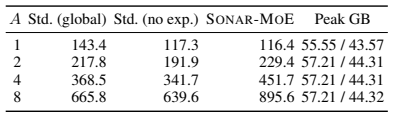
Table 8 . Gradient accumulation with A microbatches per step (OL- MoE, 500 steps). Step time in ms; peak allocated memory in GB for standard training (both variants) / SONAR-MOE. SONAR-MOE makesAupdates per step.
Original paper · CC BY 4.0At A=2, SONAR-MOE was 5% slower than standard training with global clipping. At A=4 it was 23% slower, and at A=8 it was 35% slower. The overhead therefore grows linearly with A, because each microbatch adds one more optimizer pass.
Memory still falls at every A, from 57.21 GB for standard training to 44.31 GB for SONAR-MOE at A=2. The method becomes a different optimizer, because the hook schedule changes the second-moment estimate. Averaging the microbatch gradients divides the noise variance by A, but the hook schedule doesn't average before its second-moment updates.
Limits of the evidence
Global-norm clipping is the main open constraint for SONAR-MOE. It needs every gradient before any update, but the expert gradients are already freed during backward. The authors suggest delaying the update, or keeping, offloading or recomputing the gradients until the norm is known. A second suggestion is clipping each expert tensor by its own norm inside the hook.
The paper doesn't evaluate any of these options in this version.
Data parallelism is untested, since every run used one GPU. They ran one seed and used same-seed repeats only to measure noise. Same-seed repeats varied by at most 1.4% in step time and 0.0016 in held-out loss. Small step-time gaps should therefore be read against that noise.
Step times are comparable only within one model and backend, because the OLMoE SonicMoE rows ran on a different GPU. Peak allocated memory saving falls from 12.0 GB at batch size 2 to none at batch size 32. With gradient accumulation, the method runs A optimizer steps per step and is 5–35% slower than global clipping.
Downstream accuracy was measured only for OLMoE, so the Granite checkpoints have no task-level results. GSM8K was omitted because that model stays near 0.1 accuracy after Alpaca fine-tuning. The 8-bit AdamW check reports held-out loss only, without downstream accuracy. The held-out set has only 500 examples, so the loss comparisons rest on a small sample.
Paper info
- Authors
- Avni Mittal, Avinash Anand, Ashutosh Kumar, Dikshant Kukreja, Kritarth Prasad, Chaitanya Lakhchaura, Rishitej Reddy Vyalla, Erik Cambria, Zhengkui Wang, Rajiv Ratn Shah
- Venue
- arXiv · Preprint
- First published
- 2026-11-2
- Added
- 2026-11-4
- Updated
- 2026-11-2
- Version
- v1
- arXiv
- 2611.03577
- Category
- cs.LG · cs.AI · cs.CL · cs.PF
- Original paper terms
- CC BY 4.0
- What we show
- Paper info, commentary and permitted figures from the original paper
AI commentary is a separate explanation from the original paper and may contain errors. The original paper and figures follow each source's terms of use and any rights noted separately.
Abstract
Most parameters of a Mixture-of-Experts (MoE) model belong to its experts, and standard training keeps every expert gradient in GPU memory until the optimizer step. This memory grows with the number and size of the experts, so it rises as MoE models scale. We introduce Sonar-MoE, which updates each expert tensor during the backward pass and frees its gradient right away. It brings optimizer-in-backward from dense models to batched MoE expert tensors, so the GPU never holds more than one layer of expert gradients. When we fine-tune OLMoE-1B-7B and Granite-3.1-3B-A800M in bf16 with two expert-kernel backends, Sonar-MoE lowers peak memory by 19% to 22%. Its updates are bitwise identical to standard training without expert gradient clipping, and held-out loss stays within 0.003 of all baselines. Each step also takes 17% to 23% less time than standard training with global-norm clipping. Updating whole batched tensors rather than individual experts is what keeps Sonar-MoE fast, as it avoids a 20% to 72% slowdown while using the same memory. Sonar-MoE matches optimizer-in-backward over all parameters in memory and speed while still clipping the dense parameters.
Quote from the paper
Avni Mittal, Avinash Anand, Ashutosh Kumar, Dikshant Kukreja, Kritarth Prasad, Chaitanya Lakhchaura, Rishitej Reddy Vyalla, Erik Cambria, Zhengkui Wang, Rajiv Ratn Shah (2026). Sonar-MoE: In-Backward Expert Updates for Memory-Efficient Mixture-of-Experts Training. arXiv:2611.03577v1. https://arxiv.org/abs/2611.03577v1
BibTeX
@misc{mittal2026sonar,
  title = {{Sonar-MoE: In-Backward Expert Updates for Memory-Efficient Mixture-of-Experts Training}},
  author = {Avni Mittal and Avinash Anand and Ashutosh Kumar and Dikshant Kukreja and Kritarth Prasad and Chaitanya Lakhchaura and Rishitej Reddy Vyalla and Erik Cambria and Zhengkui Wang and Rajiv Ratn Shah},
  year = {2026},
  eprint = {2611.03577},
  archivePrefix = {arXiv},
  url = {https://arxiv.org/abs/2611.03577v1}
}