Paper commentary
Accelerate Bench: Evaluating Agents for Application-Level Program Optimization
Accelerate Bench tests whether coding agents can optimize whole applications
- Problem Existing benchmarks start from human optimization commits, so they already know where the fix lives. That leaves open whether an agent can find its own optimization across a complete program.
- Method Accelerate Bench fixes each task's workload, correctness checks and timing window, and leaves the optimization choice to the agent. A hidden verifier scores the final submission on private inputs.
- Results The best of 16 agents reached a Score@1 of 67.4%, and the two leading agents were at least 2x faster on 22 or more of the 32 tasks.
Where commit-based benchmarks stop
Making an application faster is usually an iterative loop of measuring execution, locating bottlenecks, changing code, and checking the end-to-end effect while correctness holds. A coding agent could in principle run that loop, but the change that helps may sit in the build or runtime settings rather than in one function.
GSO and SWE-fficiency start from human optimization commits or pull requests, which gives realistic repositories and expert reference patches. That anchor is useful, but it means the benchmark already knows where the fix lives.
Local speedups count only in proportion to their share of total time, because timing covers the whole workflow. A faster kernel therefore helps little if the rest of the workflow dominates the measured runtime. They don't let a shortcut that skips a required output earn a speedup, since such a run fails correctness.
The SU2 task shows this scope: agents may edit solver routines, common libraries, and compilation flags within the permitted directory. Those constraints keep the agent's choices tied to the same computation the benchmark checks.
Defining a task by its workload
The core idea is to pin down what must be computed and how the workload is timed, and to leave the optimization itself open. Every one of the 32 tasks pins the computation, the complete outputs, the checks that involve saved state, and the timing window. Agents may edit application source, compiler options and dependencies inside a permitted directory, but the scored time covers the whole timed workflow.
For SU2, every run must finish all 250 iterations on a 10,216-element mesh and write five complete flow-field snapshots.
Each task ships a baseline program, build and execution scripts, instructions and a public test, all inside a container with fixed CPU core and memory limits. During a run the agent can call the public test as often as it likes, and the test rebuilds the current program and runs it on a few public inputs. The public test reports correctness and runtime, but the agent never sees the checking code.
Once the run ends, a hidden verifier recompiles what was submitted and executes it on about four private inputs of the same kind. Held-out inputs are often larger or freshly randomized, so a tuning that only helps on small inputs earns less.
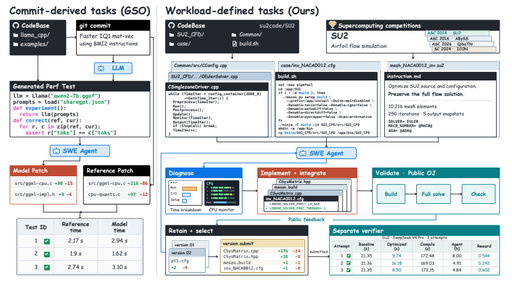
Figure 1 | Application performance engineering in Accelerate Bench.Left: GSO derives optimiza- tion tasks and reference patches from human commits (Shetty et al., 2025). Right: Accelerate Bench defines tasks by an application and its workload, illustrated withSU2. The agent diagnoses perfor- mance, modifies implementation, compiler options, and runtime configuration, and uses complete public tests to guide revisions and candidate selection. A separate verifier rebuilds and scores the final submission. GSO’s table shows three example tests; theSU2 table reports three DeepSeek V4 Pro runs. SU2 runtime sums the mean solver times over three verification cases. Compile time is reported separately and excluded from reward; Agent time covers the agent-execution phase. The diagnostic displays illustrate the tools used in this workflow.
Original paper · CC BY 4.0 · Bowen Liu, Yuhan Li, Nuo Chen, Weile Luo, Miao Peng, Qintong Zhang, Qifan Zhang, Jia Li, Ziqi Gao, Lydell Huang · Accelerate Bench: Evaluating Agents for Application-Level Program Optimization · Original paper figure · Extracted the figure area from page 2 of the original PDF.How the reward is computed
Each task's reward starts from a runtime ratio, and a correctness flag gates the result. The reward compares the submitted runtime with the baseline runtime, and it is zero when the program fails the final checks. Outcomes without a valid runtime also get zero, so a fast program with wrong output earns nothing. A correct 2× speedup earns 0.5, because the reward is the fraction of baseline runtime removed.
A correct program that isn't faster earns zero, and the clipping at zero keeps the reward from going negative.
Score@1 averages these rewards over the 32 tasks, so every task carries the same weight. Failures caused by the agent, such as incorrect output, out-of-memory termination or timeout, are scored. The provider's safety system halted three Claude Opus 5.5 runs, and those runs count as failures.
The fraction A_τ counts the tasks whose run is correct and reaches at least a τ-fold speedup. The thresholds 1.25× and 2× correspond to runtime savings of at least 20% and 50%. Appendix A.1 adds the stricter thresholds of 5× and 10× for the strongest runs. KernelBench uses a similar joint check of correctness and speed.
Speedups are measured against task-provided baselines, which have varying degrees of tuning. Some speedups exploit structure in the workload, such as the HPCG-derived operator that admits a direct solver.
Build and runtime settings on one source
The GROMACS replay isolates configuration by keeping the source fixed and changing only the build and runtime settings. The four configurations cross SIMD disabled or AVX2 with one or four threads, all on four physical cores.
Speedups range from 0.289× to 2.123× across the four configurations. Every configuration passes the numerical and replay checks. Each setting was timed on six private physical profiles, with three interleaved repetitions per profile. AVX2 with four threads reaches 2.123×, while AVX2 with one thread gives only 0.709×.
The QiboTN replay toggles three changes in a full factorial design: broad dispatch (B), state reuse (R) and deferred loading (L). Adding deferred loading to the B-on variant improves runtime by 6.343–6.409×. Adding it to the all-off variant improves runtime by only 1.014–1.015×, so L matters mainly when B is on.
Each round ran six fresh-process variational circuits with 9–14 qubits. The reported ranges include both input and timing variation, because the rounds use different circuit seeds. The GROMACS replay covers one source tree, and the QiboTN replay covers one submitted program. They didn't test other source trees or submissions, so these numbers describe only these two programs.
What the leaderboard separates
Score@1 ranges from 25.5% to 67.4%, so the size of the speedup is what sets the agents apart. The two leading agents are at least 2× faster on 22 or more tasks.
Figure 2 splits the first-run Score@1 by application area and shows the top six agents in each area. Claude Opus 5.5's three stopped runs count as zero, two on Transport tasks and one on a Numerics task. The area view shows where the ranking changes, but the paper uses it as a descriptive breakdown rather than a separate test.
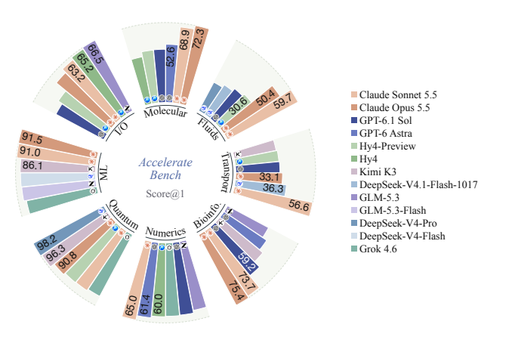
Figure 2 | Score@1 by application area.Benchmark v1.1, first run of the 16 agents in Table 1; top six agents per area, increasing clockwise. Labels give the top three scores (%); each sector is scaled to its own maximum (dashed arc). Claude Opus 5.5’s three runs stopped by the provider’s safety system, on two Transport tasks and one Numerics task, count as zero (Table 1).
Original paper · CC BY 4.0The v1.0 analysis asks a different question from the leaderboard: what the agents actually change in the application. It draws on annotated trajectories of five agents and on controlled replays of their programs. Across 476 labeled runs, computation or reuse changes appear in 225 runs. Compiler and build tuning appear in only 40 of those runs.
Where the Accelerate Bench limitations stop the results
Speedups are measured against task-provided baselines that have varying degrees of tuning, so they show improvement from those starting points only.
Table 1 reports one run per agent, and only two agents have repeated runs.
Prevalence estimates for trajectory behaviours rest on reviewed samples, and version histories cover 31 runs in seven applications. Most candidates have one timing observation, and one timing comparison can misstate which of two candidates is faster. Controlled experiments establish effects only for the tested artifacts, workloads, and settings.
Paper info
- Authors
- Bowen Liu, Yuhan Li, Nuo Chen, Weile Luo, Miao Peng, Qintong Zhang, Qifan Zhang, Jia Li, Ziqi Gao, Lydell Huang
- Venue
- arXiv · Preprint
- First published
- 2026-11-16
- Added
- 2026-11-17
- Updated
- 2026-11-16
- Version
- v1
- arXiv
- 2611.20882
- Category
- cs.AI
- Original paper terms
- CC BY 4.0
- What we show
- Paper info, commentary and permitted figures from the original paper
AI commentary is a separate explanation from the original paper and may contain errors. The original paper and figures follow each source's terms of use and any rights noted separately.
Abstract
Application optimization requires coding agents to discover useful changes and coordinate them across a complete program while preserving the required computation. We introduce Accelerate Bench, a benchmark of 32 CPU optimization tasks adapted from scientific applications and supercomputing competitions. Each task provides a working program and specifies the workload, correctness requirements, timing boundaries, and permitted edits, leaving agents to choose where and how to optimize. Public testing supports iterative development, and a separate verifier scores the final submission. On benchmark version 1.1, we evaluate 16 coding agents, each pairing a model with a harness. Their Score@1 ranges from 25.5% to 67.4%. Most of their programs are correct, and the size of the speedup separates them: the two leading agents are at least 2x faster on 22 or more of the 32 tasks, while the other fourteen reach 2x on 8 to 17 and leave 125 of their 412 correct outcomes below 1.25x. Controlled replays show why coordination across an application matters: identical source code runs between 0.29x and 2.12x depending only on build and runtime settings, and one code change is worth 1.01x or 6.4x depending on another. Accelerate Bench pairs executable workloads with agents' programs and trajectories to evaluate both their gains and the process behind them.
Quote from the paper
Bowen Liu, Yuhan Li, Nuo Chen, Weile Luo, Miao Peng, Qintong Zhang, Qifan Zhang, Jia Li, Ziqi Gao, Lydell Huang (2026). Accelerate Bench: Evaluating Agents for Application-Level Program Optimization. arXiv:2611.20882v1. https://arxiv.org/abs/2611.20882v1
BibTeX
@misc{liu2026accelerate,
  title = {{Accelerate Bench: Evaluating Agents for Application-Level Program Optimization}},
  author = {Bowen Liu and Yuhan Li and Nuo Chen and Weile Luo and Miao Peng and Qintong Zhang and Qifan Zhang and Jia Li and Ziqi Gao and Lydell Huang},
  year = {2026},
  eprint = {2611.20882},
  archivePrefix = {arXiv},
  url = {https://arxiv.org/abs/2611.20882v1}
}