Paper commentary
MessyNav: Zero-Shot Navigation via Manipulation in Messy Environments
MessyNav lets robots decide which obstacles to move without training
- Problem Robots stall when chairs or boxes block a path, because classical planners treat every obstacle as a wall. Existing interactive methods need simulation or per-scene instructions, so they generalize poorly to new objects.
- Method MessyNav asks a vision-language model to label each object as interactive or not, before any planning. The task planner then picks moves such as swipe, pick up, or move to, using those labels.
- Results On 15 real-robot scenes, MessyNav reached 67% success, compared with 40% for a VLM planner without the affordance step.
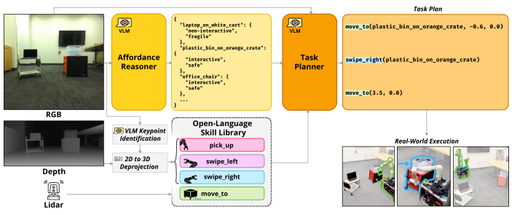
Figure 2 :MessyNav: A framework for zero-shot open-world interactive navigation. MessyNavconsists of anAffordance Reasonerthat infers object interactability from an RGB image using a VLM to evaluate both robot-centric physical feasibility and object-centric interaction safety. For example, it will label a cart with a laptop as non-interactive while labeling a wheeled crate with a bin as interactive. Given the object affordance labels, aTask Plannerthen sequences manipulation and navigation actions from an open-language skill library containing a simple set of motion primi- tives (pick up,swipe left,swipe right) and a LiDAR-based navigation stack (move to) that we find can tackle a wide range of interactive navigation scenarios. Finally, the generated plan is executed by grounding object references in 3D coordinates using VLM keypoint identification, semantic segmentation, and depth-based deprojection.
Original paper · CC BY 4.0 · Kenneth Llontop, Cherie Ho, Dylan Zhou, Anuva Banwasi, Priya Sundaresan, Carlota Parés-Morlans, Jeannette Bohg · MessyNav: Zero-Shot Navigation via Manipulation in Messy Environments · Original paper figure · Extracted the figure area from page 4 of the original PDF.Why obstacles stall classical and learned navigation
Classical navigation stacks treat every obstacle as a static geometric boundary, so a robot stalls when a chair or box could simply be pushed aside. The authors frame classical planning as a geometric problem, while interactive navigation becomes a semantic decision under geometric constraints. Deciding whether an object can move depends on fragility, portability, and function, which geometry alone rarely reveals.
Learning such cues through task-specific training is costly, so the authors look for a zero-shot route.
Prior interactive navigation methods rely on simulation-based learning or on predefined category-level affordances. Learning-based methods depend on data-intensive simulation and reward engineering, which limits generalization to novel real-world scenarios. A fixed category label breaks down when the same kind of object needs different decisions, such as a cart carrying glassware versus an empty cart.
The closed-set baseline reaches only 24.4% accuracy, because its predefined taxonomy misses many novel objects.
Language-based interactive methods check geometric feasibility or rely on predefined object categories. Neither approach considers instance-level semantic context, such as surroundings, signs, or contents. A height threshold fails too, since the height-only baseline reaches 59.9% accuracy. That heuristic misclassifies tall but movable objects, such as suitcases and rolling carts, and short but fragile ones.
MessyNav instead reasons about each object's affordance zero-shot with a VLM, and it requires no training or simulation. The authors argue that open-world, instance-level, and context-aware reasoning is essential for interactive navigation.
Separating what to move from how to move it
MessyNav splits interactive navigation into two decisions: what to interact with, and then how to interact with it. The affordance reasoner runs first and judges which obstacles can be moved, while the task planner later chooses the moves. The authors expected this explicit prior to help the robot make better context-dependent decisions. Folding affordance into the planner, the authors argue, misses cues like fragility, stability, and value.
The reasoner gives each object an affordance label of interactive or non-interactive, plus a property of safe, fragile, or immovable. It works in two stages, and the first checks robot-centric physical feasibility against the robot's configuration and gripper payload limits. An object counts as interactive only when it passes both stages, and objects that function together are treated as one unit.
The task planner then receives those labels, the current RGB image, and a planning prompt that lists its skills. It returns a structured plan, for example moving to a point, swiping a suitcase left, and then moving to the goal.
In real-robot trials, vlm-planner-only reached 40% (6/15), while MessyNav reached 67% (10/15). The closed-set-planner, which uses fixed category affordances, did worse than vlm-planner-only. In the Figure 4 scene, only MessyNav labeled both the suitcase and the cart correctly before it planned a swipe. The authors read these gaps as evidence that open-world affordance reasoning, rather than the planner alone, drives the gains.
How an RGB frame becomes an executed plan
The affordance reasoner starts from one RGB image of the scene and a short task description. It runs two checks, and the first asks whether the robot can physically move an object at all. That check reads the robot's configuration, gripper payload limits and manipulation skills from the prompt. Only objects that pass this feasibility step reach the second check, an object-centric safety judgement.
The safety check weighs fragility, value and whether an arrangement looks intentional, plus potential damage to the robot or environment. An object counts as interactive only when it passes both checks, and otherwise it's non-interactive with a property of fragile or immovable. Objects that function together, like a set of china cups that becomes fragile as a unit, receive one shared label.
The task planner receives the affordance labels, the current scene RGB image and a planning prompt that lists its skills. That prompt asks it to analyze free space and find blocking objects, favoring pick for small graspable items and swipe for large ones. The planner returns a structured plan, for example move to(suitcase, -0.6, 0), then swipe left(suitcase), then move to(goal x, goal y).
Object names in the plan get grounded to 3D with VLM open-vocabulary pointing and segmentation on the RGB image. Following HoMeR, the 2D image coordinates are deprojected with depth and known camera intrinsics into a robot-centric point cloud. The resulting point is then transformed to world frame using the robot's current pose. The primitives are move to, pick up, and swipe left or swipe right, and each uses the VLM's pointing and segmentation to find grasp or approach points.
move to relies on ROS2 Nav2 and LiDAR for obstacle avoidance. The authors chose simple primitives so that any gain can be traced to the affordance stage rather than controller quality.
Affordance accuracy against fixed category labels
The affordance task uses a hand-labelled evaluation set of 100 images with 217 objects across 14 locations. The set holds 94 interactive objects and 123 non-interactive objects, and it was used only for evaluation. It includes same-category objects whose label changes with context, which tests instance-level reasoning. Accuracy counts the fraction of objects whose predicted label matches the human annotation.
The height-only baseline treats any object taller than 0.2m as non-interactive, so it avoids every tall object. That rule reaches 59.9% accuracy and often misclassifies tall but movable objects such as suitcases and rolling carts. The closed-set baseline uses a fixed list of 100 categories, with 50 interactive and 50 non-interactive, generated offline.
Because that list doesn't cover new objects, closed-set reaches only 24.4%, the lowest score in the table. Closed-set-oracle builds its categories from the evaluation items and reaches 66.4%, but its labels stay fixed for each category.
MessyNav reaches 85.7% accuracy, which is 19.3 percentage points above closed-set-oracle. The authors read this gap as evidence that predefined category labels miss context-dependent affordances. Figure 3 shows a cluttered scene where category labels mislabel a rolling cart and a suitcase.
To test dependence on the VLM, the authors swapped the model used for affordance reasoning while keeping the prompt fixed. With claude-opus-5, gemini-3-flash-preview and gpt-5.6-luna, MessyNav scored 87.1%, 85.7% and 86.2%. Closed-set-oracle scored 69.1%, 66.4% and 67.3% on the same three VLMs, so MessyNav stayed about 18 points ahead.
Where the affordance stage changes the plan
The Figure 4 scene shows the clearest case where the affordance stage changes the plan. MessyNav labels the suitcase non-interactive and the cart interactive, then swipes the cart aside to clear the path. vlm-planner-only plans directly from the image and swipes the unstable suitcase. closed-set-planner misclassifies the suitcase as interactive, which leads to an unsafe plan.
closed-set-planner swaps MessyNav's affordance reasoner for the closed-set-oracle labels. Those oracle labels are fixed per category, so they can't capture the cart's context. vlm-planner-only fails on harder cases, such as a suitcase with or without caution tape. The authors attribute these failures to missing cues about fragility, stability, and value.
They read closed-set-planner's weaker result as inaccurate fixed priors being worse than no prior at all.
Across the ablation, separating affordance reasoning from planning raises success from 40% to 67% over end-to-end VLM planning. The success metric counts only trials that reach the goal without executing unsafe actions.
Real-robot success and execution time
MessyNav runs on the TidyBot++ platform, which pairs a 7-DoF Kinova arm with a holonomic mobile base. The authors add a Unitree L2 LiDAR for base odometry and mapping, plus two ZED 2 cameras. They test all four methods across 15 real-world scenes in a messy bedroom and a conference room. That setup gives 60 robot trials in total.
A trial counts as a success only when the robot reaches the goal without unsafe actions. The two ablations isolate the affordance stage: vlm-planner-only removes the affordance reasoner, while closed-set-planner swaps in the closed-set-oracle labels.
Execution time excludes VLM queries and averages only over successful trials. MessyNav averages 45.8 s, versus 45.9 s for vlm-planner-only. closed-set-planner averages 50.4 s, and height-only averages 24.5 s. The height-only average comes from just two successful trials, the 2 of 15 successes. MessyNav therefore takes longer than the height-only stack on average, 45.8 s against 24.5 s.
Offline planning at larger scale
The offline study tests high-level planning over 55 real-world scenes in 5 environments. It extends the earlier trials, which covered 15 scenes in 2 environments. Execution is set aside, so the plans are assumed to run perfectly at the low level. A human evaluator marks a trial successful only if the plan reaches the goal without touching non-interactive objects.
Each method runs 15 passes over all 55 scenes, so each one yields n = 825 trials.
MessyNav reaches 62.4% success, while vlm-planner-only reaches 55.4%. That is a gain of 7.0 percentage points over the strongest baseline from the real-robot trials. A paired t-test over per-run success rates gives t(14) = 4.71 and p < 0.001. The real-robot gain was 27 percentage points, and this offline gain is smaller because execution is assumed perfect.
At night both methods degrade, and MessyNav underperforms the baseline there. The authors hypothesize that reduced visibility weakens the fine visual cues that affordance reasoning depends on. They didn't test a fix for poor illumination and leave robustness under poor lighting to further research.
Limitations and open questions
MessyNav's manipulation primitives run open-loop, so the system has no closed-loop correction during a grasp or swipe. The paper reports no experiment with VLA policies or with speed and force modulation, so that benefit remains untested.
MessyNav has no persistent memory, so it can't plan over longer horizons or recover well from earlier interactions. The authors' example is a robot that forgets a backpack was too heavy to move. The real-robot evidence covers 15 scenes in two environments, with 60 robot trials in total. The offline evaluation assumes perfect low-level execution, so it doesn't measure execution failures.
Paper info
- Authors
- Kenneth Llontop, Cherie Ho, Dylan Zhou, Anuva Banwasi, Priya Sundaresan, Carlota Parés-Morlans, Jeannette Bohg
- Venue
- arXiv · Preprint
- First published
- 2026-11-5
- Added
- 2026-11-6
- Updated
- 2026-11-5
- Version
- v1
- arXiv
- 2611.07417
- Category
- cs.RO · cs.CV
- Original paper terms
- CC BY 4.0
- What we show
- Paper info, commentary and permitted figures from the original paper
AI commentary is a separate explanation from the original paper and may contain errors. The original paper and figures follow each source's terms of use and any rights noted separately.
Abstract
Real-world environments are messy, with paths often blocked by everyday objects like chairs and toys, requiring robots to perform interactive navigation by manipulating obstacles to clear a path. Existing methods rely on extensive simulation-based learning or per-scene instructions specifying which objects to avoid or manipulate. They struggle to generalize across novel objects, diverse environments, and varied contexts such as a cart of fragile glassware that should be avoided while an empty one can be pushed. We formalize this problem as open-world interactive navigation and present MessyNav, a zero-shot framework based on vision-language models (VLMs). At its core, MessyNav performs explicit VLM-based affordance reasoning before task planning to decide whether to swipe, pick up, or avoid an object and produce a high-level plan. Evaluated on a mobile manipulator across real-world indoor and outdoor environments, MessyNav improves success rate by 27 percentage points (pp) over the strongest baseline in real-robot trials and achieves statistically significant gains in a larger-scale offline evaluation, without task-specific training.
Figures from the paper
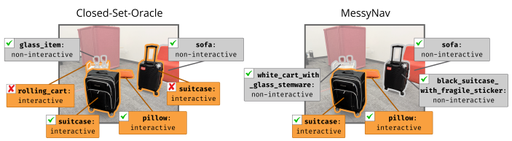
Figure 3 :MessyNavreasons about context, not just object category.In this cluttered scene, closed-set-oracleassigns affordances by category alone, misclassifying the rolling cart as interactive (ignoring the glassware it carries) and the suitcase as interactive (ignoring its fragile sticker). In contrast,MessyNavreasons at the instance level. It treats the cart and the glass stemware as a single fragile unit and reads the sticker on the suitcase as a contextual cue, cor- rectly labeling both as non-interactive.
Original paper · CC BY 4.0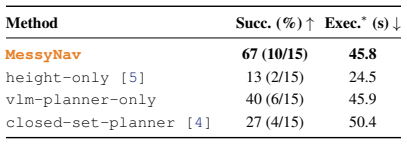
Table 2 :Real-World Interactive Navigation Results. MessyNavachieves the highest success rate across 15 real-world scenes. Success requires reaching the goal without any unsafe interactions. ∗Execution time (ex- cluding VLM queries) averaged across successful trials.
Original paper · CC BY 4.0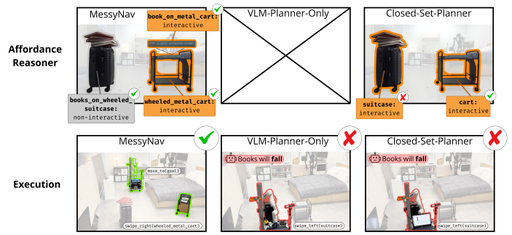
Figure 4 :Explicit affordance reasoning improves context-dependent task planning.In this scene, a suitcase supporting a stack of books is inherently unstable, while the black cart holding a single book can be safely cleared.[Left]MessyNavreasons about affordances before plan- ning, correctly labeling the suitcase as non-interactive and the cart as interactive, and swiping the cart aside to clear the path.[Middle]vlm-planner-onlyplans directly from the image with- out an explicit affordance stage and incorrectly decides to swipe the unstable suitcase.[Right] closed-set-plannerassigns fixed category-level affordances that misclassify the suitcase as interactive, leading to an unsafe plan.
Original paper · CC BY 4.0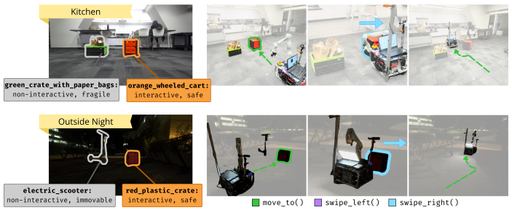
Figure 5 :Qualitative Results across Environments.We deployMessyNavin varied settings to test its zero-shot capability. The robot successfully reasons about affordances and executes interac- tions across different lighting conditions, environments, and object types.
Original paper · CC BY 4.0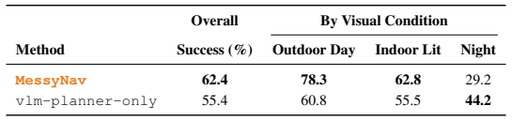
Table 3 :Scaled-Up Offline Planning Results.We evaluate high-level planning performance across 55 real-world scenes in 5 environments, with 15 repeated trials per scene, assuming perfect low-level execution.MessyNavoutperforms the strongest baseline from the real-world evaluation overall and under well-lit conditions, while nighttime remains challenging for both methods.
Original paper · CC BY 4.0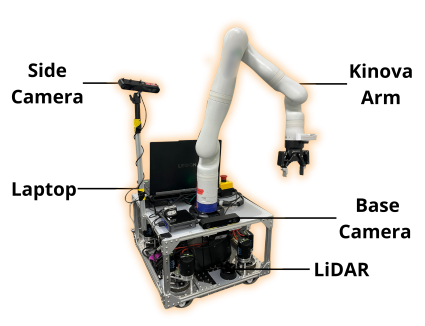
Figure 6 :Hardware:We deploy on the TidyBot++ holonomic mobile manipulator [18] with two cameras and a LiDAR for perception. An onboard laptop runs the autonomy stack.
Original paper · CC BY 4.0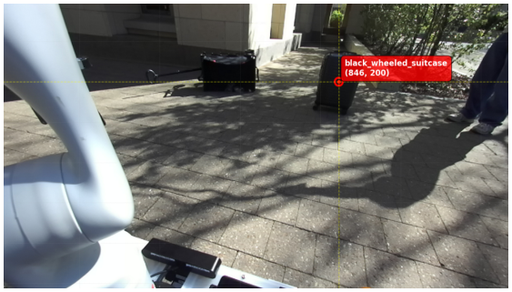
Figure 7 :Example Open-Vocabulary Keypoint Detection.We usegemini-2.5-pro[36] to detect keypoints of objects specified by the task planner through language queries.
Original paper · CC BY 4.0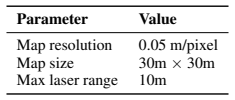
Table 4 :Navigation Costmap Parameters.
Original paper · CC BY 4.0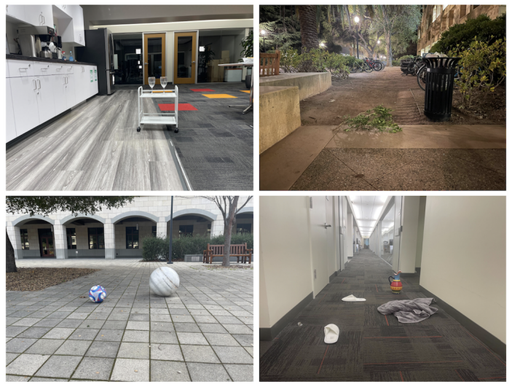
Figure 8 :Sample Images from the Affordance Reasoning Evaluation Set.To evaluate open- world interactive navigation, we collect images spanning three types of diversity: objects, environ- ments, and contextual variations.
Original paper · CC BY 4.0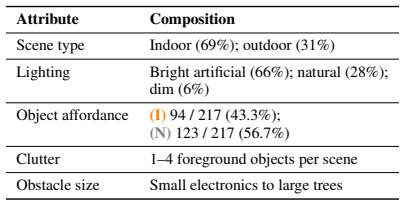
Table 5 :Composition of the Affordance Reasoning Benchmark.Our benchmark spans diverse environments, lighting, clutter, and obstacle sizes.
Original paper · CC BY 4.0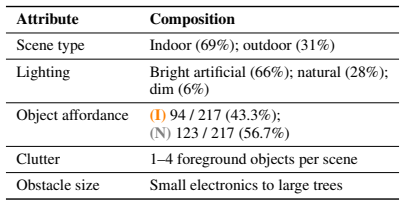
Table 6 :Example Context Variations in Affordance Reasoning Evaluation Set.The same object type is marked asinteractive (I)ornon-interactive (N)depending on context.
Original paper · CC BY 4.0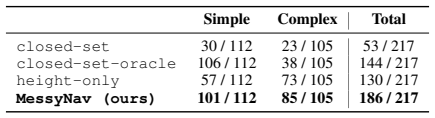
Table 7 :Affordance Reasoning Comparison. Number of objects with correctly classified inter- activity.Simplecases contain objects in their default state, whileComplexcases involve context- dependent configurations (e.g., cart with fragile items, table with vase, suitcase with caution tape).
Original paper · CC BY 4.0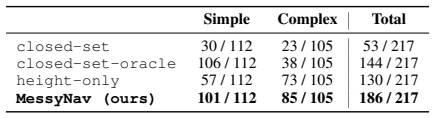
Table 8 :Real-World Navigation Scenarios.To evaluate open-world interactive navigation, we test in a bedroom and conference room environments while deliberately varying objects, contexts, and required interactions across trials. The scenes also contain furniture (e.g., couch, bed, drawers, meeting tables) as fixed non-interactive obstacles. Additional objects are listed and marked asin- teractive (I)ornon-interactive (N). Environment Additional Objects in Scenario Interaction Needed
Original paper · CC BY 4.0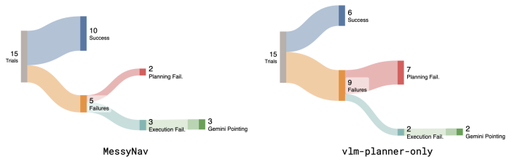
Figure 9 :MessyNav’s failure breakdown compared to the strongest baseline.Sankey diagrams of trial outcomes forMessyNav(left) andvlm-planner-only(right) over 15 real-world tri- als.MessyNavsucceeds on 10/15 trials versus 6/15 forvlm-planner-only. While most of vlm-planner-only’s failures are planning failures in whichvlm-planner-onlydecides to interact with non-interactive objects (7 of 9),MessyNavreduces these to 2, showcasing the impor- tance of explicit affordance reasoning.
Original paper · CC BY 4.0Quote from the paper
Kenneth Llontop, Cherie Ho, Dylan Zhou, Anuva Banwasi, Priya Sundaresan, Carlota Parés-Morlans, Jeannette Bohg (2026). MessyNav: Zero-Shot Navigation via Manipulation in Messy Environments. arXiv:2611.07417v1. https://arxiv.org/abs/2611.07417v1
BibTeX
@misc{llontop2026messynav,
  title = {{MessyNav: Zero-Shot Navigation via Manipulation in Messy Environments}},
  author = {Kenneth Llontop and Cherie Ho and Dylan Zhou and Anuva Banwasi and Priya Sundaresan and Carlota Parés-Morlans and Jeannette Bohg},
  year = {2026},
  eprint = {2611.07417},
  archivePrefix = {arXiv},
  url = {https://arxiv.org/abs/2611.07417v1}
}