Paper commentary
Collaborative Search Meets Large Language Models: An Empirical Study
LLM agents change how pairs search together, compared with conventional tools
- Problem In-chat search plugins return raw result lists that interrupt conversations. Partners must then read and merge the evidence themselves.
- Method CoSearchAgent reads the group chat and rewrites the query, then retrieves web pages. It writes a source-grounded answer and asks clarifying questions when needed.
- Results QAAgent produced the most independent reports, at 99.45% against 60.77% for Google Search.
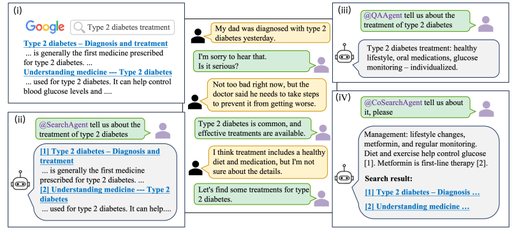
Figure 2 : Four search scenarios in the user study: (I) Google Search, used independently outside the conversation; (II) SearchAgent, integrating results into the conversation; (III) QAAgent, directly answering queries; and (IV) CoSearchAgent, interpreting multi-user conversations, retrieving relevant information, and providing tailored responses.
Original paper · CC BY 4.0 · Peiyuan Gong, Jiamian Li, Erhan Zhang, Fengming Liang, Kexin Liu, Yue Chen, Jiaxin Mao · Collaborative Search Meets Large Language Models: An Empirical Study · Original paper figure · Extracted the figure area from page 5 of the original PDF.Why in-chat search leaves the synthesis to partners
Collaborative search lets a group pool what each member finds and refine its understanding through discussion. Early systems were standalone applications that bundled shared query histories, group notes, and ways to recommend results. Many users, however, prefer coordinating in familiar instant messaging platforms and running conventional search tools on the side.
That preference pushed designers toward search embedded in chat, so results appear inside the conversation partners are already having.
A search plugin keeps results source-grounded, but it can interrupt a conversation and leaves users to evaluate and integrate what they read. A QA agent gives a synthesized answer that fits the context, yet it may hallucinate and draw attention away from the original sources. Figure 1 shows the plugin as a source-rich option that takes longer browsing, and QAAgent as convenient answers that may leave users unsure.
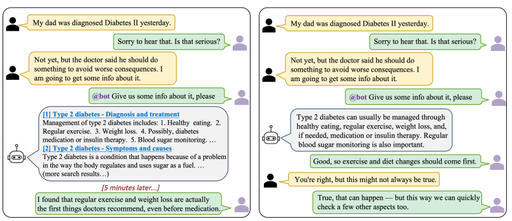
Figure 1 : Two lightweight collaborative search systems: (I) Search Plugin, which provides reliable sources but requires longer browsing; and (II) QAAgent, which offers convenient answers that speed up discussion but may leave users unsure.
Original paper · CC BY 4.0Manual Google search pulls partners out of the chat, so collaborators have to share their findings by hand. Participants shared 11.80 URLs per task with Google Search, compared with 2.08 with SearchAgent. Participants clicked 23.20 results with SearchAgent, compared to 13.18 with CoSearchAgent. Google Search scored 4.56 on richness and SearchAgent 4.48, both above QAAgent's 4.21, because copied webpage content carries more detail.
LLMs could go further by reading evolving conversations, rewriting group needs into queries, and asking clarifying questions. Grounded in web retrieval, they can also cite supporting sources and reduce unsupported claims. To the authors' knowledge, no earlier study compared such agents with conventional tools in collaborative search.
How the two LLM agents work in the chat
QAAgent answers from the LLM itself, with no search step in between. Given a query q, its prompt P_qa asks the LLM to write the answer a_qa directly, as Equation 1 shows. The prompt takes only the LLM and the query as inputs, so the group conversation never reaches the answer. That makes QAAgent the simpler of the two designs the authors compare.
CoSearchAgent starts from the whole multi-user history U and the current query q. A query-rewriting prompt, P_rewrite, resolves references and recovers context that the conversation left out. It returns a self-contained rewritten query and a flag o that says whether clarification is needed. When the history can't resolve an ambiguity, the clarification prompt P_clarify writes one question for the group.
After the reply, the agent adds it to the history, reassesses the query, and starts the search when nothing else is missing.
The rewritten query goes to a search engine, which returns the top m results as title, link, and snippet. These extracted passages replace the original snippets, so the links stay reachable while the relevant text comes first. A retrieval-augmented generation prompt, P_rag, then takes the rewritten query and the extracted evidence and writes a source-grounded answer a_c.
The answer carries citations that tie each claim to its supporting sources.
The authors describe this design as delegating query interpretation, retrieval, and answer synthesis to the agent. They keep the evidence inspectable, so participants can verify and discuss what the agent found. The authors reimplemented CoSearchAgent from their earlier work rather than running a released system.
Pairs, scenarios, and counterbalancing
The study recruited 80 students who formed 40 pairs and worked through four open-ended search tasks. Each pair met every scenario once, with task assignment and order balanced by two orthogonal 4×4 Latin squares. Each task-scenario combination was therefore completed by 10 pairs.
Partners could talk only through a dedicated Slack channel and could not speak aloud during the tasks. Independent searching was allowed only in the Google Search scenario.
Google Search meant leaving the chat to search, then sharing selected links back into it. SearchAgent returned ranked results without synthesizing an answer, while QAAgent gave a direct answer with no web results. CoSearchAgent interpreted the conversation, rewrote queries, retrieved web information, and asked clarifying questions when needed.
Each participant completed three seven-point questionnaires: workload with six items after every task, collaboration experience with five items after every task, and agent experience with seven items after each agent scenario. Afterward, each participant took part in a face-to-face interview that covered rankings and trade-offs. The study asks how search experience differs, how tool choice shapes strategy and collaboration, and how agents affect final report quality.
Workload and collaboration ratings
Each of the six workload items scores higher when the experience feels more favorable. QAAgent posted the top ratings for mental demand at 4.38 and physical demand at 5.04. Its temporal demand score reached 5.50, and its effort score reached 4.46. Both LLM agents beat Google Search significantly on mental demand, physical demand, temporal demand, and effort.
QAAgent also outperformed SearchAgent on the first three of these demand items.
CoSearchAgent led on perceived performance at 5.03 and on frustration at 5.59. Neither of these two items showed a significant pairwise difference between scenarios. The authors read the pattern as LLM help cutting task demands, not changing how well people felt they performed.
QAAgent had the highest mean on all five items, ranging from 5.83 to 6.41. It beat Google Search significantly on C1 to C5 and SearchAgent significantly on C1 to C3. CoSearchAgent beat Google Search significantly on C1, C2, C3, and C5.
QAAgent's broadest gains came in mutual awareness and information sharing. This section doesn't report any direct measure of task outcomes, only questionnaire ratings.
Agent ratings: usefulness, completeness, and reliability
CoSearchAgent ranked highest on five of the seven agent items in the questionnaire. It scored 5.45 on usefulness and 5.21 on completeness. Its time savings score reached 5.70, and its workload reduction score reached 5.81.
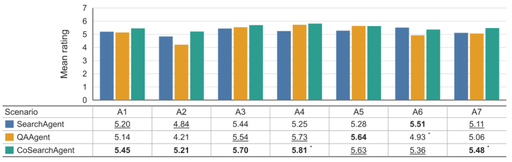
Figure 5 : Mean agent-experience ratings across scenarios. ∗ indicates a significant difference from SearchAgent (𝑝<.05).
Original paper · CC BY 4.0CoSearchAgent's overall satisfaction score was 5.48. CoSearchAgent significantly outperformed QAAgent on completeness. It also significantly outperformed both QAAgent and SearchAgent on overall satisfaction.
QAAgent ranked highest on collaboration support, with a score of 5.64. SearchAgent ranked highest on reliability at 5.51. That reliability score was significantly higher than QAAgent's.
QAAgent's direct answers lost ground on completeness and reliability. The paper ties this gap to answer generation without web grounding. CoSearchAgent still gave the strongest overall experience among the agents.
Messaging, invocation, and source sharing across scenarios
Excluding agent-generated messages, QAAgent participants produced 39.23 turns per task, the highest count of the four scenarios. Google Search had the fewest turns at 28.13 per task, while SearchAgent and CoSearchAgent reached 30.60 and 28.90. QAAgent was invoked 25.63 times per task, which makes it the most frequently called agent. CoSearchAgent was invoked 16.80 times per task, and SearchAgent 11.48 times.
The authors read direct answers as prompting repeated requests and more discussion, whereas CoSearchAgent's conversations resemble those under conventional tools.
Google Search participants shared 11.80 URLs per task, far above 2.08 with SearchAgent and 1.03 with CoSearchAgent. QAAgent is excluded from this comparison because it gives no external sources. Participants clicked results 23.20 times with SearchAgent but only 13.18 times with CoSearchAgent. Result-page navigation fell from 30.48 actions with SearchAgent to 25.53 with CoSearchAgent.
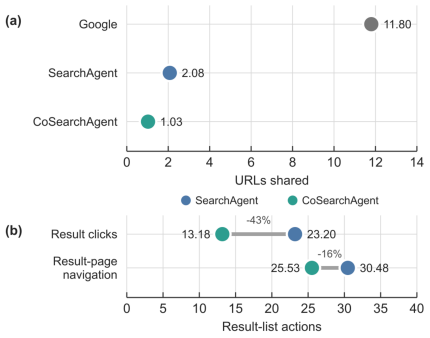
Figure 7 : Evidence-use behavior: (a) URLs shared and (b) result-list actions; percentages show reductions from SearchAgent to CoSearchAgent.
Original paper · CC BY 4.0Mean interaction duration was 16.05 minutes with Google Search and 17.51 minutes with SearchAgent. It reached 19.28 minutes with QAAgent and 20.48 minutes with CoSearchAgent, so agent-assisted scenarios kept conversations going longer. It was 61.4% for SearchAgent, 58.9% for Google Search, and 51.8% for CoSearchAgent. QAAgent supports quicker exchanges, whereas CoSearchAgent pairs longer sessions with slower turn-taking.
The authors connect that slower pace to CoSearchAgent's clarification, retrieval, and synthesis stages.
Richness and independence in final reports
Richness scores how much relevant and specific information a report holds, on a 1 to 7 scale. Google Search reached 4.56 and SearchAgent 4.48, while QAAgent scored 4.21 and CoSearchAgent 4.24. The authors attribute the gap partly to response-length limits on the lightweight agents in multi-party conversations. Webpages give participants more material to select from than copied agent responses do.
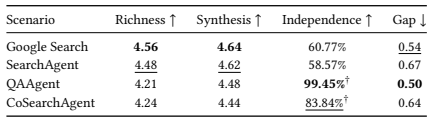
Table 5 : Final-report quality. Bold: overall or web-evidence best; underline: second overall.†:𝑝<. 001vs. Google Search and SearchAgent.
Original paper · CC BY 4.0Independence counts the share of 30-character sequences in a report that don't appear in another pair's report on the same task. QAAgent reached 99.45% and CoSearchAgent 83.84%, versus 60.77% for Google Search and 58.57% for SearchAgent. Both LLM-based agents beat the two conventional scenarios on this measure at p<.001. The authors stress that a high score doesn't by itself prove originality or plagiarism.
Pair gaps ran from 0.50 to 0.67, and QAAgent had the smallest gap at 0.50. Among the three scenarios with browsable web evidence, CoSearchAgent recorded the highest independence score. Direct access to result pages brings more factual detail, along with more reuse of source wording. Experience gains didn't necessarily carry over into report quality, since the authors found that LLM agents encouraged independent wording.
What participants said about the trade-offs
Lower effort didn't shorten sessions, so the workload gains didn't carry over to speed. Google Search remained the fastest scenario, according to the interview discussion. Participants found CoSearchAgent slow, and 23 of them raised this point. The clarification process was burdensome for 13 participants. QAAgent demanded prompt reformulation from 17 participants.
Users faulted QAAgent for missing sources and low confidence, a complaint raised by 30 participants. CoSearchAgent's inspectable links were valued by 52 participants. Web grounding didn't guarantee quality, because questionable sources drew 8 mentions. Weakly related links drew 7 mentions, and SearchAgent kept the highest reliability rating.
CoSearchAgent's clarification questions helped 12 participants refine ambiguous needs. Its context-sensitive interaction was credited by 9 participants. CoSearchAgent misread context for 8 participants, and over-clarifying was raised by 13. The authors conclude that LLM agents help coordination only when they fit the group's intent and leave the conversation undisturbed.
Most future requests concerned the shared search process, such as summaries of conversations or results (14). Outlines or mind maps were requested by 13 participants. Requests for search guidance included refined search suggestions (10). Participants also asked for one-click invocation, copying, and link sharing (9). They wanted control over when proactive help appears, and they warned against slow responses.
Limitations of the study
Because these tasks had no single correct answer, report quality rests on four measures: richness, synthesis, independence, and gap. GPT-5.6-Sol scored each report twice, and the scoring prompt omitted participant identities.
CoSearchAgent is the authors' own reimplementation, so its behavior reflects their design choices. Independence counts the 30-character text sequences in a report that don't also appear in another pair's report on the same task. That measure captures wording overlap only, so a high score doesn't by itself prove originality.
The plug-in setting used a fixed word limit, so the richness gap may partly reflect that limit. Interview themes are counts of unique participants, so they show how many people raised each theme. The authors didn't test other topics, group sizes, or agent designs.
The study recruited 80 students in 40 pairs, so the sample consists of students only. Each pair completed four tasks, one under each scenario, and 10 pairs completed each task-scenario combination. Latin-square counterbalancing spread the task and scenario orders across the pairs. Google Search participants could search on their own, while the three agent scenarios blocked other search tools.
Paper info
- Authors
- Peiyuan Gong, Jiamian Li, Erhan Zhang, Fengming Liang, Kexin Liu, Yue Chen, Jiaxin Mao
- Venue
- arXiv · Preprint
- First published
- 2026-11-3
- Added
- 2026-11-5
- Updated
- 2026-11-3
- Version
- v1
- arXiv
- 2611.04619
- Category
- cs.IR
- Original paper terms
- CC BY 4.0
- What we show
- Paper info, commentary and permitted figures from the original paper
AI commentary is a separate explanation from the original paper and may contain errors. The original paper and figures follow each source's terms of use and any rights noted separately.
Abstract
Collaborative search enables users to address complex information needs jointly. Advances in large language models (LLMs) enable autonomous agents to support collaborative information seeking within shared communication spaces. However, little is known about how these agents shape search experiences, behaviors, and outcomes compared with conventional search tools. We conduct a user study with 80 students working in 40 pairs. Each pair completes four collaborative search tasks under four scenarios: QAAgent, which answers queries using an LLM's parametric knowledge; CoSearchAgent, which uses multi-user conversational context to reformulate queries, retrieve web information, and generate source-grounded answers, while asking clarifying questions when needed; an in-chat search plugin that returns result lists; and manual Google Search. After each task, participants complete several questionnaires assessing their search experience and independently write a report; after all tasks, they participate in individual interviews. Results show that LLM-based agents reduce perceived workload, support collaboration, and reshape communication and evidence-use practices. They also encourage more independent paraphrasing, albeit at the cost of report richness. To the best of our knowledge, this is the first systematic empirical comparison of LLM-based agents and conventional tools for collaborative search across search experience, user behavior, and collaborative outcomes.
Quote from the paper
Peiyuan Gong, Jiamian Li, Erhan Zhang, Fengming Liang, Kexin Liu, Yue Chen, Jiaxin Mao (2026). Collaborative Search Meets Large Language Models: An Empirical Study. arXiv:2611.04619v1. https://arxiv.org/abs/2611.04619v1
BibTeX
@misc{gong2026collaborative,
  title = {{Collaborative Search Meets Large Language Models: An Empirical Study}},
  author = {Peiyuan Gong and Jiamian Li and Erhan Zhang and Fengming Liang and Kexin Liu and Yue Chen and Jiaxin Mao},
  year = {2026},
  eprint = {2611.04619},
  archivePrefix = {arXiv},
  url = {https://arxiv.org/abs/2611.04619v1}
}