Paper commentary
Feeling Easier, Working Harder: Cognitive Load in AI-Assisted Code Comprehension
Generative AI assistance raises developers' cognitive workload without improving code comprehension
- Problem Developers rarely notice the extra mental effort that AI tools add while reading code. Questionnaires only capture workload after the task, and physiological sensors are costly and fragile in everyday work.
- Method The authors use the Tactile Detection-Response Task, a cheap live measure. A small vibrating motor cues the participant, and slower button replies signal that the reading task is drawing more resources.
- Results AI assistance raised tDRT reaction times by 11.2% compared with unassisted reading. Perceived workload stayed unchanged, and comprehension scores showed no clear AI benefit.
Why AI-assisted reading may still cost effort
Prior estimates put the share of developer time spent on comprehension at up to 70%, compared with writing. Generative AI assistants aim to lighten that load by turning dense logic into plain-language explanations. Each interaction, however, splits attention, since prompting, switching between code and chat, and checking output all take effort.
Developers tend to hold positive impressions of these tools, so they may underestimate the effort they spend.
Post-task questionnaires like the NASA Task Load Index only capture what a developer recalls once the task is over. Physiological tracking with EEG, fNIR, or eye tracking can follow workload moment by moment. Those devices need expensive equipment and fragile calibration. Their signals also pick up noise easily, which makes them hard to use in everyday software engineering work.
A cheaper live measure is therefore needed, and the authors introduce the Tactile Detection-Response Task for that role.
As code synthesis tools spread, developers shift from writing code to reading, evaluating, and verifying it. Reading AI-generated code stays mentally taxing, so developers may offload the comprehension itself. Managing the primary task while calibrating trust in the AI forms a dual-task workflow. This overhead can encourage superficial skimming, which may cause developers to overlook latent bugs.
The Detection Response Task asks participants to respond to periodic stimuli while they perform a primary task. Its reaction times shift with workload, which gives a low-overhead way to track it in real time. The authors therefore use this measure as a core behavioral metric in their study.
A tap-response test as a workload gauge
The tDRT turns response speed into a workload measure, since a person busy with a main task answers a light cue more slowly. The authors bring the Tactile Detection-Response Task into software engineering as a low-cost, ISO-standardized instrument. They chose a tactile cue so the stimulus doesn't compete with the visual code review. A small vibrating motor on the participant's shoulder or arm delivers each cue, and a finger-mounted button captures the reply.
Cues arrive every 3 to 5 seconds, and slowed or missed replies signal that the primary task is drawing more resources.
Raw responses go through ISO 17488 filtering before any model sees them. A response under 100 ms counts as an accidental trigger and gets dropped. A cue with no response within 2,500 ms is logged as a miss. Hit rates stayed above 95%, so the authors kept reaction time as the outcome and treated hit rate as a check. Hit rates were 93% with AI and 97% without, a small drop that points the same way as reaction time.
Because the reaction times were right-skewed on a QQ-plot, the authors log2-transformed them before fitting the models.
Typing conflicts with the finger button, so the experimenter flagged typing periods by hand. Screen recordings cross-checked those flags, and the responses inside them were excluded. Removing the typing windows dropped 2.6% of observations. Keeping them would have raised the AI coefficient from 11.2% to 13.5%, so removal is the conservative choice.
After this filtering, the analysis used 8,048 tDRT responses.
Six tasks, two conditions, three sizes
Twenty-two people finished the study, but the authors kept only twenty for analysis. One session was dropped because technical issues disrupted the study structure. The other excluded participant never used the AI during the AI-assisted condition, so that data couldn't count. Each remaining participant worked six Java tasks, with two snippets at each of three sizes.
Small snippets were about 30 lines, medium ones about 45 lines, and large ones about 70 lines.
Inside each size block, the two snippets were assigned one to AI and one to no-AI. The AI assignment was counterbalanced across participants, so each snippet got an equal share of AI-assisted and unassisted trials. The three size blocks ran in random order, which limits learning and fatigue effects. Blocking by size keeps participants from switching snippet lengths, which the authors argue could inflate cognitive load on its own.
Task order inside each block was also randomized, which prevents order or priming effects.
In AI tasks, participants used the Gemini web interface on a secondary monitor during the reading phase. Each task opened a fresh chat in an incognito window, so the model kept no history from earlier trials. Participants chose how often to prompt the model, with no limits on wording or format and no prompt training. In control tasks, the AI window was minimized while participants read the code.
Each task then ran a reading phase, a four-question quiz without AI, and a questionnaire.
Participants rested for one minute before starting the next task. Quiz time limits of 2, 2.5 or 3 minutes kept participants from deferring code reading to the quiz phase. The tDRT recorded across all six tasks, split into reading and quiz segments.
How the statistics were set up
The reaction time data had a right skew, so the authors checked a QQ-plot and then log2-transformed the values. Linear mixed-effects models were chosen because they handle correlated repeated measurements within each participant. They also keep participants with incomplete observations in the analysis instead of dropping them. AI assistance, its interactions with Task Phase, Code Size and Java Experience, plus Code Size and Task Phase as controlled factors, were set as fixed effects.
Participant ID and Code Snippet ID served as random intercepts, which absorb differences between people and between coding tasks.
The authors started from a baseline with the main effect of interest and a participant intercept. They added further terms one at a time and kept a term only when it lowered the Akaike Information Criterion. Gender, GPA and LLM usage frequency explained almost no variance and raised AIC, so the authors dropped them. Each effect was tested with a likelihood ratio test that compares a full model against a null model lacking only that term.
Testing one factor per comparison keeps it clear which variable drives any change in model fit.
The authors split the analysis into six LME models, each with its own likelihood ratio test. Models 1 to 4 analyzed tDRT reaction time, covering the main AI effect and the interactions with Task Phase, Code Size and Java Experience. Table IV lists each model with its chi-square, degrees of freedom and p-value.
For RQ2, the 0 to 4 accuracy score went into a linear mixed model with by-participant and by-snippet random intercepts. Since the score is bounded and discrete, the authors also fit an ordinal cumulative-link mixed model as a sensitivity check. For RQ3, two researchers open-coded the responses and grouped the segments in an affinity diagram made with Miro.
A third researcher refined the groupings through a negotiated agreement, and a fourth reviewed the resulting themes. No predefined codebook was used, so the themes came from the data itself.
AI raised measured workload
The main test asks whether AI assistance changes tDRT reaction time across the whole study. Adding the AI term improved model fit, with χ2 = 17.37 and p < .001. Back-transforming the log2 coefficients, the AI condition ran 11.2% slower than the unassisted condition. Read plainly, participants needed more time to respond to the same tactile cue, which points to higher workload.
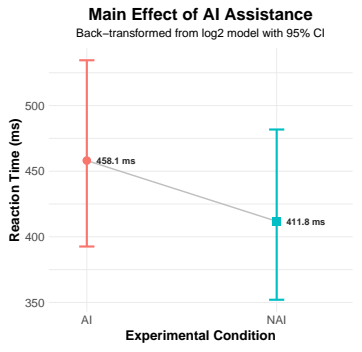
Fig. 4 : Main Effect of AI Assistance on Cognitive Workload
Original paper · CC BY 4.0 · Maryangela White, Maximilian Rose, Matthew Buckman, Amy McDonnell, Francisco Ortega, Bianca Trinkenreich · Feeling Easier, Working Harder: Cognitive Load in AI-Assisted Code Comprehension · Original paper figure · Extracted the figure area from page 7 of the original PDF.Next, the code size model checked whether that cost changed with snippet length. The interaction was significant (χ2 = 8.22, p = 0.016), yet AI still raised reaction times in every size category. AI raised reaction times by 8.9% for small snippets, 15.2% for medium snippets and 9.5% for large snippets. The authors trace the medium-size peak to a baseline dip in the control condition, not to an AI spike.
The small and large AI increases were statistically equivalent, with z = 0.25 and p = 0.968. Because the AI cost stayed nearly constant across sizes, it doesn't fit a story where AI simply lowers intrinsic load.
Model 4 tested whether Java experience changed the AI effect on reaction time. That interaction wasn't significant (p = 0.828), so the increase held regardless of Java familiarity in this sample.
Workload stayed high in the quiz
The next test asks whether the AI cost differed between the reading phase and the quiz phase. The model shows a significant interaction, χ2 = 7.10 with p = 0.008, so the size of the gap depended on phase. During reading, the AI condition's reaction times ran 12.7% above the control condition, with p < .001. In the quiz, the gap shrank to 6.9% above control, still statistically distinct at p = 0.007.
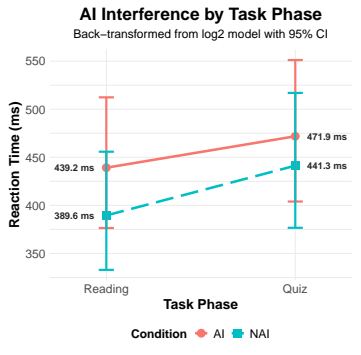
Fig. 5 : Interaction between AI Assistance and Task Phase on Cognitive Workload
Original paper · CC BY 4.0The quiz had no AI available, yet participants who used AI during reading still responded more slowly. The authors call this a carryover effect, where reading with AI left a higher workload in the later unassisted phase. The control group rose more steeply into the quiz, which the authors attribute to its lower reading-phase baseline. Typing can't explain this, because no typing happened during the quiz in either condition.
The highest workload measurements came in the quiz phases, so mechanical interference from the tool doesn't account for the sustained impact.
The authors read the sustained elevation as AI short-circuiting active inference and execution tracing during reading. On this view, participants entered the quiz with a weaker cognitive foundation, which made the quiz more effortful. They tie this to automation complacency, and they suggest the bigger risk may be displacement of effortful processing rather than over-reliance alone.
They didn't test long-term encoding or recall, and they flag that as a question for longitudinal work. The authors say the elevation persisted beyond active tool use, so the cost outlasted the tool itself.
Self-ratings did not move
The questionnaire models asked whether AI assistance changed participants' own ratings of workload and task difficulty. Model 5 averaged the NASA-TLX sub-scales without weights, and Model 6 used one SEQ item per task. Neither model found a significant AI effect, with NASA-TLX at p = 0.180 and SEQ at p = 0.161. The likelihood ratio tests gave χ2 = 1.80 for NASA-TLX and χ2 = 1.96 for SEQ, each with one degree of freedom.
So the ratings missed the reaction time shift that the tDRT models had picked up.
Participants filled in both questionnaires right after each code task, and the tDRT device was switched off during that window. That timing means the ratings reflect what participants remembered once the task was over. The tDRT, by contrast, tracked workload continuously while participants were still working.
The authors explain the gap as a blind spot in self-report. Writing prompts, reading long model replies and switching attention between code and interface all draw on resources below awareness. They argue that NASA-TLX can't pick up costs of this kind. A similar split between objective and perceived workload appeared in earlier work, so this study doesn't claim it as new.
GenAI differs from a complex query language, because its assistants are built to lower visible friction.
Participants' ratings stayed flat even though reaction times rose 11.2% under AI assistance. The study didn't test whether a longer delay before the questionnaires would change these ratings.
Quiz scores hit the ceiling
Quiz accuracy barely moved between the two conditions, sitting at 3.22 with AI and 3.23 without on a 0 to 4 scale. The standard deviations were 0.99 with AI and 1.08 without, so the spread was similar in both groups. Each quiz had four multiple-choice questions, and each question awarded partial credit across a different comprehension facet.
Maintenance, summarization, mental execution and structural mapping each contributed to the score, which helps explain why totals bunched near the top. A perfect score across all four facets appeared on 50.0% of AI-assisted tasks and 58.3% of non-AI tasks.
The planned linear mixed-effects model used AI assistance as a fixed effect, with by-participant and by-snippet random intercepts. That model found no significant effect of AI on accuracy, with χ2(1) below 0.01 and p = .982. Because a four-point sum is bounded and discrete, the authors also fit an ordinal cumulative-link mixed model as a sensitivity check.
The ordinal model reached the same conclusion, with β = −0.16, z = 0.40 and p = .692. This check shows the null result wasn't an artifact of treating a ceiling-affected scale as linear.
The authors read these results as no evidence of benefit at the difficulty levels tested, not as evidence that AI gives none. They didn't test harder snippets, so the study can't say whether AI helps once tasks get more demanding.
Three ways participants used the AI
They kept trust narrow, using the AI for higher-level structure, and one said it gave them a useful start but not the full answer. These readers left their code reading mechanics largely unchanged, and one said they still read the code top down. Scaffolding was the most common strategy, with participants using the GenAI as an initial orientation tool beside their own reading.
Trust in Scaffolding was conditional, and it shifted with how complex a participant judged the task to be. For straightforward code, participants accepted the AI explanation at face value, one saying the code was relatively simple. For complex logic, participants kept agency by checking the AI's interpretation against their own developing mental model.
One participant said the AI moved them from reading in smaller blocks to reading by method. That shift let readers skip low-level syntax tracking and evaluate the code at a macro level.
In Displacement, AI output replaced direct code reading, and the paper reports that roughly a quarter of participants reached this strategy. Trust in this group moved toward over-reliance, so participants minimized or skipped linear code analysis. Some read the AI text almost exclusively and only glanced at the code when they had a small question.
One Displacement participant found the AI text excessive and hard to follow, and they took longer and missed information the code would have given.
What this asks of tools and courses
The authors argue that tool evaluation shouldn't rest on how easy a tool feels. Their point is that the usual framing of GenAI as a load reducer misses a dual-task structure. Each developer must manage the AI interaction alongside the code, so the comprehension task doesn't go away. Whether the net effect is positive depends on whether the help outweighs that overhead, which the authors leave for future work.
The 11.2% rise in tDRT reaction times arrived with no change in NASA-TLX or SEQ scores. Work the authors cite found that users predicted AI-assisted tasks would be faster, though completion times stayed equivalent. The authors therefore recommend pairing subjective feedback with objective cognitive load and performance metrics.
For educators, the cost that remains after the tool is removed matters most. In the quiz phase, reaction times stayed 6.93% higher in the AI-assisted condition than in the control condition. That lingering cost resembles findings on GenAI dependency and cognitive offloading, which suggest AI during learning can create a false sense of competence.
Such work also shows that unassisted performance can suffer after learning with AI.
The authors also argue that self-report alone misses hidden workload, so studies should add real-time objective metrics. They present the tDRT as an accessible and sensitive metric, unlike eye-tracking or EEG, which need complex calibration. They didn't test whether the extra load pays off on harder programming tasks.
What these results can't yet support
The sample came only from university students, so the findings may not carry over to working engineers. Students still consolidating syntax and architecture may show different workload patterns than people with settled mental models. Because these students were still building their AI habits, the results likely reflect early adoption rather than expert workflows.
The AI ran in a browser on a secondary monitor, which kept the experiment controlled. Professional tools are often built into the IDE, so the switching overhead there could differ. Workload peaked in quiz phases where no typing took place, which argues against mechanical interference as the cause.
Higher reaction times don't by themselves show harm, because more engagement can also lead to better retention. The authors name this as the main threat to their conclusion validity. Accuracy clustered near the ceiling, so the study can't show whether the extra load pays off on harder tasks.
Future work should use a wider range of task types and difficulty to test whether the load helps or harms comprehension. The authors didn't test long-term encoding and recall, so those effects remain open. Experience ranges narrower than professional levels leave the no-moderation finding open for wider groups.
Paper info
- Authors
- Maryangela White, Maximilian Rose, Matthew Buckman, Amy McDonnell, Francisco Ortega, Bianca Trinkenreich
- Venue
- arXiv · Preprint
- First published
- 2026-11-9
- Added
- 2026-11-10
- Updated
- 2026-11-9
- Version
- v1
- arXiv
- 2611.12019
- Category
- cs.SE · cs.AI
- Original paper terms
- CC BY 4.0
- What we show
- Paper info, commentary and permitted figures from the original paper
AI commentary is a separate explanation from the original paper and may contain errors. The original paper and figures follow each source's terms of use and any rights noted separately.
Abstract
Software developers spend significant time reading and understanding code, increasingly supplemented by generative AI. While these tools aim to reduce the difficulty of reading code, interacting with them introduces a dual-task environment that may impose extraneous cognitive load that is challenging to capture. This study investigates how access to generative AI affects developers' real-time cognitive workload, code comprehension performance, and self-perceived code comprehension strategies. We conducted a 3x2 within-subjects study with 20 novice CS students reviewing Java code snippets of varying lengths with or without AI assistance, followed by an AI-unassisted comprehension quiz. Cognitive workload was continuously captured using a Detection-Response Task (tDRT) during both reading and quiz phases, and compared to post-quiz NASA-TLX and SEQ scores. AI assistance significantly increased objective cognitive workload, raising tDRT reaction times by 11.2%, yet participants' perceived workload remained unchanged. Code comprehension scores were high under both conditions, with no evidence that AI assistance improved comprehension at the difficulty levels evaluated; a ceiling effect limited power to detect benefits on harder tasks. Qualitatively, participants reported trusting the AI conditionally -verifying its output against their own reading for more complex snippets, but directly trusting it for simpler code- and, while many felt their reading process was unchanged, a notable subset shifted toward skimming or reading the AI's explanations in place of the code itself. These findings reveal that developers do not accurately perceive the cognitive resources they expend when managing AI tools. This study provides evidence of added cognitive effort associated with using generative AI, pointing towards a need to account for this dual-task penalty in software engineering tools and education.
Quote from the paper
Maryangela White, Maximilian Rose, Matthew Buckman, Amy McDonnell, Francisco Ortega, Bianca Trinkenreich (2026). Feeling Easier, Working Harder: Cognitive Load in AI-Assisted Code Comprehension. arXiv:2611.12019v1. https://arxiv.org/abs/2611.12019v1
BibTeX
@misc{white2026feeling,
  title = {{Feeling Easier, Working Harder: Cognitive Load in AI-Assisted Code Comprehension}},
  author = {Maryangela White and Maximilian Rose and Matthew Buckman and Amy McDonnell and Francisco Ortega and Bianca Trinkenreich},
  year = {2026},
  eprint = {2611.12019},
  archivePrefix = {arXiv},
  url = {https://arxiv.org/abs/2611.12019v1}
}