論文解説
Code-Grounded Agentic Explanations for Static Analysis Vulnerability Findings
静的解析による脆弱性検出結果のためのコード根拠型エージェント説明
- 課題 SAST警告はルールに基づくため監査可能ですが、開発者が理解できなければ無視されやすいです。
- 手法 SAFEはSASTの検出結果を維持し、SAFE Agentがルール定義とプロジェクトのコードをツールで参照して、説明のみを生成します。
- 結果 判定精度と所要時間の差は有意ではありませんでした。
SAST警告が敬遠される理由
静的アプリケーションセキュリティテスト(SAST)ツールは、脆弱性を開発の初期段階で見つけられ、その判定はルールに基づくため監査可能です。しかし、開発者は警告を解釈できなければ、簡単に無視してしまいます。論文では、SASTツールが提供する説明が簡潔すぎるルール識別子と一般的なメッセージにとどまり、基本的なユーザビリティの基準を満たしていないと指摘されています。大規模言語モデル(LLM)はこの説明の欠落を埋められますが、モデルに検出まで任せると、静的解析が持つ監査可能性が失われます。この論文は、検出は解析器に残し、モデルには説明だけを担当させる方向を採用しています。
検出は解析器に、説明はエージェントに
SAFEは、Static Analysis Results Interchange Format(SARIF) 2.1.0形式の結果を読み込むIntelliJ IDEAプラグインで、説明を生成するバックエンドとしてSAFE Agentを備えています。エージェントのオーケストレーターは、選択された検出項目から作成したプロンプトを言語モデルに渡し、モデルが発行したツール呼び出しをプロジェクトの対象に対して実行して、その結果をモデルに返します。モデルはルール定義の参照とコードの読み取りツールを使い、解析器が実際に検査した条件とデータフローの両端を確認してから説明を書きます。エージェントはコードの修正や新しい判定を下せないよう制限されています。
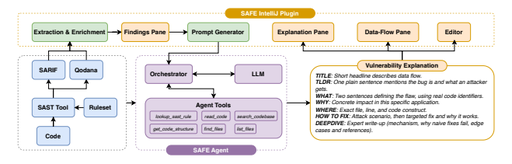
Fig. 1 : Architecture of the SAFE approach. A SAST tool applies its ruleset to the code and reports findings as SARIF or through Qodana. The SAFE plugin extracts and enriches them, lists them in its findings pane, and builds a prompt for the selected finding. In the SAFE Agent, an orchestrator relays that prompt to the language model and executes the tool calls the model issues against the project. The resulting struc- tured explanation is rendered in the explanation pane, the data-flow pane, and the editor.
出典 · CC BY 4.0 · Oshando Johnson, Ranjith Krishnamurthy, Rohith Kumar Shanmuganathan, Goran Piskachev, Eric Bodden · Code-Grounded Agentic Explanations for Static Analysis Vulnerability Findings · 論文の図を引用 · 元のPDFの9ページ目から図の部分を抽出しています。交差実験の設計と比較条件
評価は、最初のバージョンであるSAFE-Blueと、再設計版であるSAFE-Redを同じ参加者が2回使う、within-subjectsの交差実験として行われました。2つのビルドは、階層表示、エージェントのバックエンド、ワークフロー統合など複数の要素が同時に異なるため、結果は再設計全体の差としてのみ読むべきです。検出項目は、Fraunhofer IEMの非公開のJavaウェブアプリケーションHealth-Doc-ExchangeをSemgrepでスキャンして得られ、5つの脆弱性カテゴリと真陽性・偽陽性の混合で構成されました。
判定精度と修正方式の品質
判定精度は、SAFE-Blueで0.46、SAFE-Redで0.53でした。参加者ごとのWilcoxon符号順位検定では、差は有意ではありませんでした(p=.59)。未確定の判定は誤答として計算されています。累積連結モデルでは、SAFE-Redの優位なオッズ比は2.6で、95%信頼区間は0.93から7.09でした。p=.069で、有意水準に近い値でした。この修正方式の比較は2つのビルドの結果として報告されたものであり、確定的な優位とは読みません。
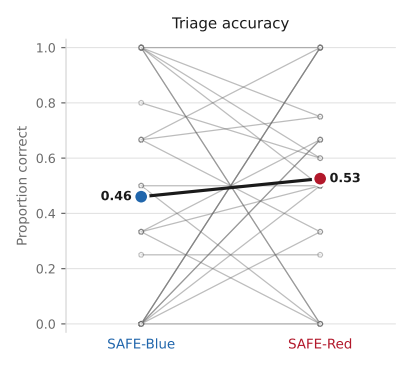
Fig. 3 : Per-participant triage accuracy for the two conditions (N= 24). Each thin line joins one participant’s two blocks, and the heavy line joins the condition means. An unsure verdict counts as incorrect.
出典 · CC BY 4.0 · Oshando Johnson, Ranjith Krishnamurthy, Rohith Kumar Shanmuganathan, Goran Piskachev, Eric Bodden · Code-Grounded Agentic Explanations for Static Analysis Vulnerability Findings · 論文の図を引用 · 元のPDFの19ページ目から図の部分を抽出しています。ユーザビリティの向上と変わらなかった信頼
知覚されたユーザビリティは、System Usability ScaleでSAFE-Blueが77.3、SAFE-Redが85.0と報告され、p=.011で有意でした。説明品質の項目の中では、次のステップの実行可能性(actionability)が+0.67の最大の差を示しました。ただし、Holm補正後は個別の項目は有意ではありませんでした。評価結果の信頼の項目は+0.04で、ほぼ変わりませんでした。インタビューでは、参加者らが、根拠の追跡は判定をより信頼させるというより、位置の把握と理解を助けると説明していました。これは、根拠の結び付きが確信よりも理解に寄与した可能性を示す、著者らの解釈です。
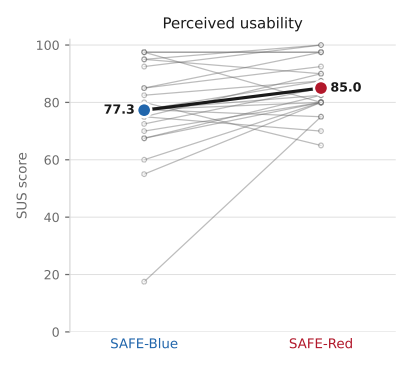
Fig. 5 : Per-participant System Usability Scale scores for the two conditions (N= 24). Each thin line joins one participant’s two blocks, and the heavy line joins the condition means.
出典 · CC BY 4.0 · Oshando Johnson, Ranjith Krishnamurthy, Rohith Kumar Shanmuganathan, Goran Piskachev, Eric Bodden · Code-Grounded Agentic Explanations for Static Analysis Vulnerability Findings · 論文の図を引用 · 元のPDFの22ページ目から図の部分を抽出しています。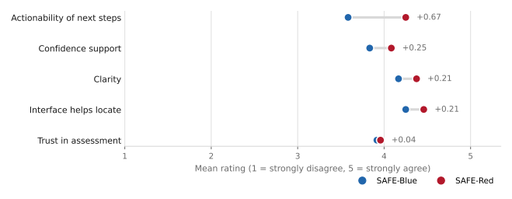
Fig. 6 : Mean ratings on the five post-task perception items, ordered by the size of the gap between conditions.
出典 · CC BY 4.0 · Oshando Johnson, Ranjith Krishnamurthy, Rohith Kumar Shanmuganathan, Goran Piskachev, Eric Bodden · Code-Grounded Agentic Explanations for Static Analysis Vulnerability Findings · 論文の図を引用 · 元のPDFの22ページ目から図の部分を抽出しています。所要時間の結果と実験の限界
発見項目あたりの所要時間は、参加者ごとの中央値で、SAFE-Blueが5.1分、SAFE-Redが4.7分でした。p=.21で、有意ではありませんでした。ブロックあたり15分の制限があったため、ほとんどの参加者は2〜3個の検出項目しか判定できませんでした。したがって、精度と時間でnull結果が出たことは、効果がないという証拠ではなく、測定条件が限られていたことを意味すると読むべきです。また、説明はセッションの前にあらかじめ生成されてキャッシュに保存されたため、生成の遅延は測定に含まれていません。
論文情報
- 著者
- Oshando Johnson, Ranjith Krishnamurthy, Rohith Kumar Shanmuganathan, Goran Piskachev, Eric Bodden
- 学会・ジャーナル
- arXiv · プレプリント
- 公開日
- 2026年11月9日
- 登録日
- 2026年11月11日
- 更新日
- 2026年11月9日
- バージョン
- v1
- arXiv
- 2611.13041
- カテゴリ
- cs.SE · cs.AI · cs.HC
- ライセンス
- CC BY 4.0
- 掲載内容
- 論文情報・解説・論文の図
この解説は、Refivuの韓国語解説をAIで翻訳したものです。不正確な翻訳や誤りが含まれる可能性があります。論文と図の利用条件は各出典に従います。
アブストラクト
Static application security testing (SAST) tools surface vulnerabilities early and their verdicts are rule-based and auditable. Yet developers routinely dismiss findings they cannot interpret. Large language models can supply the missing explanation, but designs that also hand the model the detection give up the auditability that makes static analysis defensible. We keep detection with the analyser and give the model only the explaining. A preliminary user study with 20 participants and a workshop with 19 practitioners yielded five requirements. Guided by these we redesigned SAFE, an open-source IntelliJ IDEA plugin that explains findings from any analyser reporting in the Static Analysis Results Interchange Format. It tiers explanations by demand, ties them to the reported data flow, and replaces the single-prompt backend with an agent that must consult the repository and the rule that fired before answering. A within-subjects crossover experiment with 24 participants compared the redesign against its predecessor. Perceived usability rose from 77.3 to 85.0 on the System Usability Scale. Actionability gained most among the explanation-quality items, the aspect both earlier studies flagged as weakest, and the odds of a correct remediation were 2.6 times higher. Triage accuracy and time per finding were indistinguishable, which we read as uninformative rather than as equivalence. Trust was the one measure that did not move, and the closing interviews indicate that grounding made findings easier to understand rather than easier to believe. Participants also drew a boundary no requirement anticipated, wanting the tool to find and explain while they judge and apply.
この論文を引用
Oshando Johnson, Ranjith Krishnamurthy, Rohith Kumar Shanmuganathan, Goran Piskachev, Eric Bodden (2026). Code-Grounded Agentic Explanations for Static Analysis Vulnerability Findings. arXiv:2611.13041v1. https://arxiv.org/abs/2611.13041v1
BibTeX
@misc{johnson2026code,
  title = {{Code-Grounded Agentic Explanations for Static Analysis Vulnerability Findings}},
  author = {Oshando Johnson and Ranjith Krishnamurthy and Rohith Kumar Shanmuganathan and Goran Piskachev and Eric Bodden},
  year = {2026},
  eprint = {2611.13041},
  archivePrefix = {arXiv},
  url = {https://arxiv.org/abs/2611.13041v1}
}