Paper commentary
PROPS: Can Visual Generators Keep the Current Look of a Prop?
Image generators keep redrawing props from the request instead of their current look
- Problem Generators redraw a prop from the request or bring back an old look.
- Method PROPS pairs twin histories that differ only in one prop's look.
- Results All 34 open and closed systems tested show prop drift. The best open system, FLUX.3-klein, passes 30.4% of pairs, while 20 of 25 open systems stay below 10%.
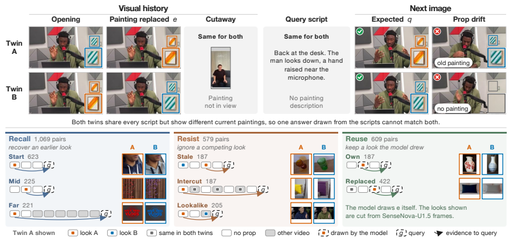
Figure 3 .Prop drift and twin histories.Top: a Resist-Stale pair. The twins share every script and differ only in how the painting looks, so one answer drawn from the scripts cannot match both. SenseNova-U1.5 keeps the old painting in twin A and draws no painting in twin B. Bottom: the history of twin A in each subtype, with the evidence frame linked to the query, and the two looks of one pair. The Reuse looks shown come from SenseNova-U1.5, and each system is scored on its owne. Numbers count pairs.
Original paper · CC BY 4.0 · Xiangzhao Hao, Dianyi Wang, Keyan Zhou, Yiqian Zhang, Zefeng Zhang, Bailin Li, Kun Zhan, Junchi Yan · PROPS: Can Visual Generators Keep the Current Look of a Prop? · Original paper figure · Extracted the figure area from page 4 of the original PDF.Why the current look gets lost
The model then has to recover that look from earlier frames and from the edits made since. Instead, it often redraws the object from the request alone or pulls back an older look, and that mistake then feeds into later steps.
The authors call this failure prop drift.
A judge is no better when it sees only one history. In a check that paired each output with either its own history or a history showing another look, three VLM judges preferred the matching history on only 52 to 61% of sides, where chance is 50%.
Twin histories as the test
A look that is right on one side is wrong on the other, so a generator that always favours one look can pass at most one side.
Each side gives the generator the keyframes and shot scripts up to a query step, followed by the query script, and asks for the next keyframe. When no script describes the look, both twins share every script.
Follow asks a judge which of two reference crops the prop in the output matches, or neither. Exec asks yes or no questions about the scripted change on the output alone, and a side passes only when every answer is correct.
PROPS-Train and why ordinary chains fall short
The authors built PROPS-Train with 80,250 chains and 120,339 supervised targets, each one recovering an earlier state or carrying a scripted change forward.
A DINOv2 nearest-neighbour search checks how close the training images sit to the benchmark images.
How far current systems get on PROPS
All 34 systems evaluated show prop drift, and the open systems show it most. Among the 25 open systems on the full benchmark, FLUX.3-klein reaches 30.4%, while 20 of the 25 stay below 10%. Strong text-to-image models also score low, with Qwen-Image-2.1 at 2.2% and FLUX.2-dev at 2.0%.
On phase A, SenseNova-U1.5 executes the action on 88.5% of sides but shows the right look on only 47.6%.
The closed agents do better, but none solve the benchmark. The best, GPT-5.6 with GPT Image 2.5, reaches 71.0% on phase A, which is 29.0 points short of the ground truth.
Planner or editor: which part limits the agent
An agent here has a planner that reads the history and an editor that draws the frame. Swapping one part at a time shows which one limits the score. Starting from a Qwen3.8 planner with Qwen-Image-Edit at 19.1%, a stronger GPT-5.6 planner lifts the agent to 55.7%.
A stronger GPT Image 2.5 editor alone lifts the agent to 29.3%. Only the two stronger parts together reach 71.0%. For this open agent the planner's understanding is the larger gap.
Closed planners pass the evidence frame to the editor on 94 to 100% of sides in every subtype.
What training on PROPS-Train changes
Its overall score rises from 26.7% to 47.0%. The gain is +20.2 points with a 95% interval of +17.1 to +23.4.
Follow rises from 46.3% to 71.2%, while Exec moves from 87.8% to 86.1%. The other three models also gain, with BAGEL and the two LoRA runs at 9.0 to 10.8 points.
Removing the intercut returns drops the overall score from 47.0% to 33.3%. Three runs with different training orders average 49.1% with a standard deviation of 1.6.
Which frames SenseNova-U1.5 relies on
The authors changed SenseNova-U1.5's history at test time, with its weights fixed.
Can the judge be trusted
The judge agrees with a human annotator on 86.2% of side outcomes over 240 labelled sides, with Cohen's κ of 0.68. The pass rate is 31.2% by the judge and 30.0% by human annotation.
Limitations
The pass rates move with the judge. Under Qwen3.8 instead of Gemma-4, the fine-tuned SenseNova-U1.5 scores 44.3% instead of 49.4%. Its gain over the base model drops from 19.6 to 14.8 points.
The human check covers 240 decisions from five systems, and the annotator marked 10 decisions as unsure and left them out. Closed systems were run only on the 600-pair phase A split, with an interval of ±4.5 points there.
Paper info
- Authors
- Xiangzhao Hao, Dianyi Wang, Keyan Zhou, Yiqian Zhang, Zefeng Zhang, Bailin Li, Kun Zhan, Junchi Yan
- Venue
- arXiv · Preprint
- First published
- 2026-11-22
- Added
- 2026-11-24
- Updated
- 2026-11-22
- Version
- v1
- arXiv
- 2611.29665
- Category
- cs.CV
- Original paper terms
- CC BY 4.0
- What we show
- Paper info, commentary and permitted figures from the original paper
AI commentary is a separate explanation from the original paper and may contain errors. The original paper and figures follow each source's terms of use and any rights noted separately.
Abstract
Many generation tasks draw the next image from a visual history, such as storyboards, illustrated stories and multi-turn editing. A new request often states what happens next without restating how earlier objects look. Instead of recovering an object's current look from the history, generators often redraw it from the request alone or bring back an outdated look, and the error can carry into later steps. We call this failure prop drift. Existing evaluations rarely isolate it, because similarity to the history rewards copying and a judge that sees a single history cannot tell a look recovered from that history from one the generator happens to prefer. We introduce PROPS, a benchmark of 2,257 pairs of twin histories that end on the same request but show one prop in two different looks. A pair passes only if the generator draws the matching look on each side and carries out the request, so a look preferred by the generator or the judge passes at most one side. All 34 open and closed systems we test show prop drift, and even systems that carry out the requested action on most sides often lose the current look of the prop. Swapping the planners and editors of agents further shows that both history understanding and image generation limit agent performance. We also build PROPS-Train, 80,250 training chains in four tracks whose targets recover an earlier state or carry scripted changes forward, and fine-tuning on it clearly improves all four tested models. Both datasets will be publicly released.
Quote from the paper
Xiangzhao Hao, Dianyi Wang, Keyan Zhou, Yiqian Zhang, Zefeng Zhang, Bailin Li, Kun Zhan, Junchi Yan (2026). PROPS: Can Visual Generators Keep the Current Look of a Prop?. arXiv:2611.29665v1. https://arxiv.org/abs/2611.29665v1
BibTeX
@misc{hao2026props,
  title = {{PROPS: Can Visual Generators Keep the Current Look of a Prop?}},
  author = {Xiangzhao Hao and Dianyi Wang and Keyan Zhou and Yiqian Zhang and Zefeng Zhang and Bailin Li and Kun Zhan and Junchi Yan},
  year = {2026},
  eprint = {2611.29665},
  archivePrefix = {arXiv},
  url = {https://arxiv.org/abs/2611.29665v1}
}