Paper commentary
BunshinRL: Splitting Live Agent Workspaces for Memory-Efficient Agentic RL
BunshinRL forks live workspaces so agentic RL rollouts share memory and reuse tool calls
- Problem Each agentic RL sample needs its own live sandbox, so concurrent rollouts exhaust host memory. Slow tool calls also hold up whole batches.
- Method BunshinRL forks live container workspaces instead of copying them. Rollouts share unchanged memory copy-on-write, reuse cached tool results, and run predicted tool calls alongside model reasoning.
- Results On WebArena, BunshinRL reduces peak memory by 43% compared to AgentENV. It also reduces end-to-end rollout latency by 23%.
Why rollouts run out of memory and time
Agentic RL rollouts interleave model reasoning with tool calls, so each sample keeps a persistent workspace alive across the episode. Each sample also needs its own sandbox, since one rollout's file edits or application changes must not corrupt another rollout. At 4 GB per sandbox, the authors note that a batch of 256 rollouts would need 1 TB of CPU memory.
Group-based training such as GRPO makes this worse, because it samples several trajectories per task.
Tool calls are the second bottleneck, because each one can take seconds to minutes. In synchronous RL, the slowest trajectory holds up the whole batch. Faster model inference alone doesn't remove that wait, since a long browser navigation or test suite can still delay the next step. The authors saw two chances to reuse work: identical memory inside a batch and identical tool calls across iterations.
Prefix caching can skip matched calls, but a valid hit must match the task, the workspace, and the tool-call prefix. Speculation runs a predicted call alongside policy generation, so tool latency can hide behind reasoning.
The memory half holds in practice: environments in the same GRPO group share more state than environments from different tasks. That overlap remains after ten steps, which suggests the shared state is not a one-time effect. Figure 1 splits this shared memory into file cache, heap, and shared memory, and the heap and shared-memory parts go beyond immutable files.
Sharing immutable container image layers doesn't eliminate the duplicated process memory built up during execution. At 256 concurrent rollouts, CRIU uses about 1.8 times as much peak memory as BunshinRL, which shows the value of sharing.
One primitive for three techniques: live whole-workspace forking
The authors argue that the three techniques need one primitive from the system layer: live whole-workspace forking. Memory sharing needs runtime copy-on-write isolation, so one sample's writes stay out of its neighbors' memory. Prefix reuse has to restore the state tied to cached tool results, not only the tool outputs. Incorrect speculation must leave the original workspace untouched, so rollback stays clean.
A fork shares unchanged parent memory while each side keeps executing on its own. Speculation forks the current workspace before it runs a predicted call. A child snapshot keeps only its changes relative to its parent, while it references the inherited pages.
Containers are lightweight and isolated enough for many task types, yet no existing solution supports live container forking. It maps memory copy-on-write and gives each fork a private writable file-system view. It also keeps internal communication and GUI state intact while rebuilding resources that need private copies. The authors built it by changing the Linux kernel and CRIU, and all three BunshinRL features run on it.
How memory sharing keeps rollout memory flat as branches diverge
Memory sharing starts from one physical copy of the common environment state and gives each branch private pages only when it writes. Samples in a training batch begin from one initialized workspace and create a writable branch only when their tool calls diverge. So the memory cost is the common state, each branch's private writes, and the reconstruction metadata, not a full workspace image per sample.
Figure 2 compares peak CPU memory as concurrency grows, and the gap between CRIU and BunshinRL widens because CRIU keeps private memory copies. At 256 concurrent rollouts, CRIU uses about 1.8 times as much peak memory, which shows the capacity benefit of sharing across environments.
The same sharing applies inside the snapshot store, where a child snapshot keeps only its changes relative to its parent. For example, a sample adopting C3 can reuse the base, Δ1 and Δ2 already mapped by a sample adopting C2. The saving has limits, though, because process metadata still needs private storage. Savings also decrease as trajectories overwrite shared state.
Deduplication also keeps the snapshot tree small, since the store holds only the deltas of each tool call at every child node. Freed memory then lets more rollouts run concurrently under a fixed budget and leaves room for cached states and speculative executions.
Tool-prefix caching and sparse snapshots
A cache hit needs the same tool names and arguments at every step from the initial state. A valid hit must also match the originating task and workspace, because identical arguments alone are insufficient. On the first miss, BunshinRL rebuilds the cached state up to the last tool hit and then forks a writable branch with BunshinFork.
Storing raw snapshots of every step would consume huge amounts of storage, so each child node keeps only the deltas its tool call writes. The whole prefix tree lives on disk, and a lookup rebuilds a workspace by reading from the root and adding each node's delta to the base snapshot. Reading and rebuilding from disk can be slow enough to cancel the latency that prefix reuse saves.
BunshinRL therefore keeps hot snapshots in memory under an ancestor-aware LRU policy.
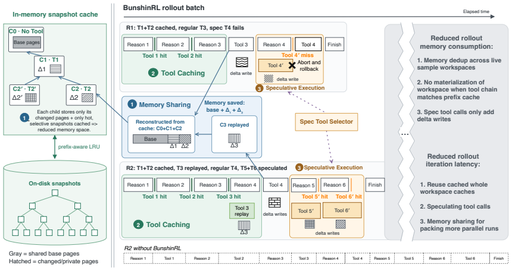
Figure 3 . Illustration of BunshinRL.Right shows two samples in a simplified rollout step; left shows the on-disk and in-memory workspace snapshot stores for tool call prefix. Reasoning steps’ generated tool call signatures are matched with the tool prefix tree. All initial matched tool calls are skipped until the first miss in tool signature (Tool 3 for R1 and Tool 4 for R2), at which point the corresponding snapshots are used to reconstruct the workspaces. As C3 is not cached in memory, Tool 3 is replayed for R2 and its delta write is added to the C0+C1+C2 snapshot. The samples execute actual Tool 3 for R1 and actual Tool 4 for R2, creating new delta CoW pages. After these calls finish, speculation starts from the resulting workspaces: Tool 4 for R1 and Tools 5 and 6 for R2. The Spec Tool Selector selects tool calls that are likely to happen from previous tool call history. When a reasoning step finishes, its output tool signature is compared with the speculative tool signature. For failed speculation, the system rolls back to the workspace snapshot before speculation.
Original paper · CC BY 4.0 · Yutong Huang, Vikranth Srivatsa, Alex Asch, Yiying Zhang · BunshinRL: Splitting Live Agent Workspaces for Memory-Efficient Agentic RL · Original paper figure · Extracted the figure area from page 5 of the original PDF.Sparse snapshots cut the memory that snapshot caches use. BunshinRL materializes snapshots only at selected tool-call boundaries and keeps the tool-call metadata for every step. A prefix without its own snapshot is rebuilt by forking the nearest retained ancestor and replaying the calls between them. The replay overlaps with model reasoning, so it stays off the critical path, as with Tool 3 replay alongside Reason 4 for R2 in Figure 3.
This design trades extra tool execution for a smaller memory footprint without adding latency.
The snapshot memory footprint is much smaller than the saving that memory deduplication gives. Because of that gap, the snapshots mainly speed up the rollout phase rather than cut peak memory. Prefix caching in the evaluation reaches a 40% hit rate in the first epoch of the Full configuration. That hit rate rises to 65% by the third epoch, as the cache holds snapshots from earlier epochs.
Speculative tool execution and the tail
The authors rely on the idea that tool calls which recurred in earlier iterations can predict a sample's next action. A small classifier, the Spec Tool Selector, chooses likely calls from the recorded history of the sample's trajectory, and BunshinRL runs the chosen call on a fork while reasoning continues. When the actual signature arrives, a match adopts the speculative state once execution completes and its dependencies are validated.
Speculation costs some CPU and memory, so it runs only for tail samples, which are identified from timings recorded in earlier iterations. The system can predict K calls at a time, and the first mismatch aborts the whole chain.
How BunshinFork rebuilds a live container
BunshinFork has to capture a consistent workspace boundary before it can build a fork. It briefly freezes the source and records the process hierarchy, threads, open descriptors, and signal and synchronization state. The freeze also records the register state needed to resume execution.
The destination gets independent namespaces, and BunshinFork restores the recorded topology inside them. Memory is handled per anonymous, file-backed, and shared region, because each kind needs different treatment. Shared-memory regions must keep their inter-process relationships within each restored workspace.
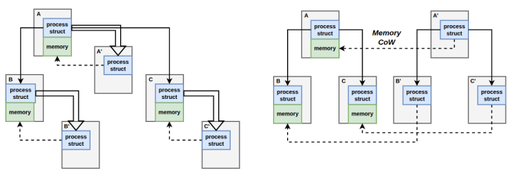
Figure 5 . Linux Process Fork vs. BunshinFork Process-Tree Fork. Left: native fork() duplicates one process as a child of the source process. Right: BunshinFork creates a sibling container and reconstructs the whole process tree inside an independent namespace.
Original paper · CC BY 4.0For memory, BunshinFork builds a Linux kernel module that installs write-protected mappings of the source's anonymous pages in each destination. No page contents are copied at fork time. The kernel's existing CoW fault handling gives a private page to whichever side writes first.
Internal TCP connections, such as browser-to-local-server links, are restored with kernel TCP-repair mechanisms inside each clone's network namespace. The GUI stack runs inside each workspace using Webtop and Selkies, so the desktop state stays with the applications it serves.
Peak memory and epoch length against CRIU and AgentENV
On OSWorld, BunshinRL cuts peak memory by 30% compared to CRIU and by 26% compared to AgentENV. All three systems ran the same GRPO loop, policy and tasks, so the gap comes from the sandbox layer. On WebArena, BunshinRL reduces peak memory by 43% compared to AgentENV. Because containers share the host kernel, that kernel can track each page across all environments.
CRIU gives every fork a private copy of the source's memory, so each fork adds the footprint of a whole environment. The authors attribute the rest of the AgentENV gap to microVM overhead, because each microVM runs its own guest kernel. At 256 concurrent rollouts, CRIU's peak memory reaches about 1.8 times that of BunshinRL.
On WebArena, a full CRIU batch did not fit in the server's 256 GB of memory, so the authors lowered CRIU's batch size. Even with the smaller batch, CRIU's epoch took 2.4 times as long as BunshinRL's. BunshinRL ran the full batch with 36% less peak memory than CRIU. Memory limits throughput here, because environments that don't fit shrink the batch.
On OSWorld, CRIU's epoch took 1.3 times as long as BunshinRL's, since every fork is checkpointed to disk first. AgentENV's OSWorld epoch took 1.2 times as long as BunshinRL's. A microVM gives the host control of virtual CPUs, and the guest kernel then places processes on those CPUs, so each process is scheduled twice.
Prefix caching and speculation on OSWorld
Three BunshinRL configurations ran on OSWorld, and each one ran a single epoch. Base shares memory across forks but uses neither tool-prefix caching nor speculative tool execution. Spec adds speculative tool execution to Base, while Full adds both tool-prefix caching and speculation. The authors also trained each configuration for five epochs.
In synchronous RL, a few stragglers set the step time, so the GPU sits underused while it waits for them. Base finished the epoch in 20.8 minutes, Spec in 19.2 minutes, and Full in 17.0 minutes. Spec ran 1.1 times faster than Base, and its last rollout finished 1.6 minutes earlier.
Full speeds up rollouts across the whole epoch, not only at the tail. Half of its rollouts finished 1.4 minutes earlier than the Base rollouts. Its last rollout finished 3.8 minutes earlier than Base's, and Full ran 1.2 times faster overall. Prefix caching skips matched calls entirely, so those calls cost no execution time at all.
A cached snapshot shares all its anonymous memory with its source environment at first. It holds a private page only after that environment later writes to the page. Full and Spec raised peak memory by about 1 GiB over Base, from 69 GiB to 70 GiB. A mispredicted speculative fork is discarded as soon as the policy issues a different call, so it holds memory only briefly.
Spec stays between 41% and 53%, so Full hits 10 to 13 points more often from the second epoch on. Neither technique changed training behavior, since all three configurations reached the same average reward in every epoch.
Memory as forks multiply
Each extra fork costs a different amount of memory under each of the three systems in the Figure 12 microbenchmark. At 16 forks, BunshinRL used 10.0 GB, while CRIU used 17.8 GB and AgentENV used 12.3 GB.
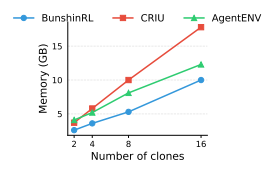
Figure 12 . Memory of Forks.Total memory of a source environ- ment and its forks as the number of forks grows, for BunshinFork, CRIU, and AgentENV .
Original paper · CC BY 4.0That remainder includes the display buffers that BunshinFork keeps private. It also includes the kernel metadata of each fork's processes. AgentENV adds about as much per fork as BunshinRL, because its forks share the snapshot's memory copy-on-write. That starting cost fits its design, since AgentENV builds its forks on Firecracker microVMs.
Each microVM runs its own guest kernel, so its page tables and other metadata stay private. The authors didn't test forks beyond 16, so the figure doesn't show how the gaps grow at larger counts. They also didn't report per-fork costs in this microbenchmark for any system beyond the totals shown.
Limits of the evidence
The isolation claim rests on containers being enough for the workloads the authors chose. Containers isolate well enough for the web and GUI tasks in this study, since those tasks need no privileges inside the guest. Nested-container workloads might instead need VMs, and the paper didn't test them.
Forking closes external connections, and each clone reopens them on its own. The authors argue that a remote server can't treat several branches as one endpoint. Restoring a local snapshot therefore can't reverse effects that reach outside the workspace.
The evaluation covers OSWorld, with 369 desktop tasks, and a shopping subset of WebArena. Every run trains Qwen3-VL-8B with one simple synchronous GRPO loop. Both baselines share that GRPO loop, policy, and tasks, so the comparison holds those fixed.
On WebArena, the full CRIU batch didn't fit in the server's 256 GB of memory. The authors lowered CRIU's batch size, so its epoch length doesn't come from a matched batch. With the smaller batch and slower forks, CRIU took 2.4 times as long as BunshinRL to finish the epoch. BunshinRL ran the full batch with 36% less peak memory than CRIU.
The 2.4 figure therefore mixes batch size with fork speed, and the paper doesn't separate the two.
Paper info
- Authors
- Yutong Huang, Vikranth Srivatsa, Alex Asch, Yiying Zhang
- Venue
- arXiv · Preprint
- First published
- 2026-11-7
- Added
- 2026-11-10
- Updated
- 2026-11-7
- Version
- v1
- arXiv
- 2611.10453
- Category
- cs.AI · cs.OS
- Original paper terms
- CC BY 4.0
- What we show
- Paper info, commentary and permitted figures from the original paper
AI commentary is a separate explanation from the original paper and may contain errors. The original paper and figures follow each source's terms of use and any rights noted separately.
Abstract
Agentic reinforcement learning (RL) rollouts interleave model reasoning with tool calls in persistent workspaces. Scaling these rollouts incurs substantial memory costs for concurrent environments, while slow tool calls delay entire rollout batches. We present BunshinRL, an agentic RL rollout system that exploits shared environment state and recurring tool calls through three techniques: memory sharing across environments, tool-prefix caching, and speculative tool execution. These techniques build on BunshinFork, a novel live whole-workspace forking mechanism for containers. BunshinFork reconstructs process trees, shares memory copy-on-write, and preserves file, communication, and GUI state, enabling cached-state reuse and rollback after incorrect speculation. We implement BunshinRL and BunshinFork through Linux kernel module and CRIU modifications. BunshinRL reduces peak memory by up to 43%, total memory consumption by up to 51%, and end-to-end rollout latency by 23%.
Quote from the paper
Yutong Huang, Vikranth Srivatsa, Alex Asch, Yiying Zhang (2026). BunshinRL: Splitting Live Agent Workspaces for Memory-Efficient Agentic RL. arXiv:2611.10453v1. https://arxiv.org/abs/2611.10453v1
BibTeX
@misc{huang2026bunshinrl,
  title = {{BunshinRL: Splitting Live Agent Workspaces for Memory-Efficient Agentic RL}},
  author = {Yutong Huang and Vikranth Srivatsa and Alex Asch and Yiying Zhang},
  year = {2026},
  eprint = {2611.10453},
  archivePrefix = {arXiv},
  url = {https://arxiv.org/abs/2611.10453v1}
}